Baked vs Mixed vs Realtime Lighting in Unity: Which to Actually Use
You drop a scene into Unity, slap down a directional light and a few point lights, hit play, and the frame rate falls off a cliff on anything that is not your dev machine. Nine times out of ten the culprit is not your meshes or your draw calls. It is your lighting. Every realtime light with shadows turned on is asking the GPU to do real work every single frame, and most beginners leave everything realtime because that is the default and it looks fine in the editor.
The fix is understanding the three light modes Unity gives you and when each one earns its keep. Every Light component has a Mode dropdown with three options: Realtime, Mixed, and Baked. They are not quality tiers where higher is better. They are trade-offs between how dynamic the light is and how much it costs at runtime. Pick wrong and you either pay for flexibility you do not need or you bake yourself into a corner you cannot animate out of.
What baking actually does
Lightmapping is the process of calculating how light bounces around your scene ahead of time and storing the result in a set of texture maps called lightmaps. Instead of the GPU working out lighting and shadows every frame, it just samples a texture that already has all of that painted in. This is why a fully baked scene can run buttery smooth on a phone that would choke on the same scene lit in realtime.
The catch is right there in the name. Baked light is precomputed, so it only applies to geometry that does not move. In Unity you mark those objects as Contribute GI (the old Lightmap Static flag). A baked directional light will light your walls and floor beautifully and cast gorgeous soft shadows, but it will completely ignore your player character, because that character was not there when the oven was running. Moving objects get their lighting from Light Probes instead, which are cheap sample points you scatter through the playable space so dynamic objects pick up the ambient color of wherever they stand.
Baked lighting is not a quality setting. It is a promise that nothing in that light's world is going to move.
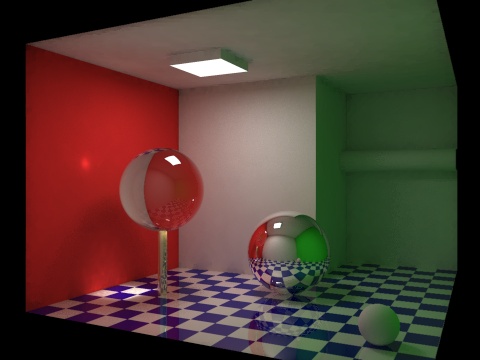
Bounced light is the whole reason to bake in the first place. Direct light is easy. The expensive part is global illumination, the indirect bounce where light hits a red wall and throws a faint red tint onto the white floor next to it. Realtime GI that computes those bounces live is brutal, which is exactly why Unity precomputes it into the lightmap.

Global illumination bounces color from surface to surface, the effect baking captures cheaply. Credit: Wikimedia Commons.

Realtime, Mixed, and Baked in plain terms
Realtime lights are computed every frame. They move, change color, flick on and off, and cast live shadows on everything including your player. This is what you want for a flashlight, a flickering torch the player carries, or a sun in a day and night cycle. It is also the most expensive option, and stacking several shadow-casting realtime lights is one of the fastest ways to tank performance.
Baked lights are the opposite. Zero runtime cost for the lighting itself, full quality bounced GI, soft baked shadows, but nothing about that light can change at runtime and it does not touch moving objects directly. Perfect for static architecture, level geometry, and anything that just sits there being pretty.
Mixed lights try to give you both. A mixed light bakes its indirect bounce and its shadows for static geometry, but still casts realtime shadows for dynamic objects from the same source. Your baked hallway keeps its lovely GI, and your character still throws a real shadow as it walks through. That is the combination most 3D games actually ship with for their main sun or key lights.
The Mixed lighting modes that trip people up
Here is the part the Unity docs bury. When you set a light to Mixed, its exact behavior is not controlled on the light. It is controlled project-wide by the Lighting Mode setting in the Lighting window (Window then Rendering then Lighting). You get four choices and they matter a lot.
Baked Indirect bakes only the indirect bounce and computes all direct light and shadows in realtime. Best looking, most expensive of the mixed modes, no baked shadow distance limit. Shadowmask and Distance Shadowmask bake both indirect light and the shadow occlusion into a separate shadowmask texture, then blend baked and realtime shadows based on distance. This is the sweet spot for a lot of games: crisp realtime shadows up close, cheap baked shadows in the distance. Subtractive bakes direct light too and gives you only a single low-fidelity dynamic shadow. It looks flat, but it is the cheapest mixed mode and it is genuinely the right call for low-end mobile or a stylized flat art style where you do not want fancy shadows anyway.
The lightmapper itself got a lot faster
If your memory of baking is watching a progress bar crawl overnight, good news. In Unity 6 the Progressive GPU Lightmapper is the default backend, and it bakes on your GPU and VRAM instead of your CPU. In most setups it is dramatically faster than the old CPU path. It also has a feature called lightmapper tiling, so when a big scene blows past your available VRAM it does not just fall back to the slow CPU lightmapper. It borrows some system memory and bakes the lightmap in tiles sized to whatever GPU memory you have. The practical upshot is that iterating on lighting is finally fast enough to actually experiment.
One thing to know if you are on an older project or following an old tutorial: Enlighten Realtime GI, the system that used to compute bounce lighting live, is deprecated. Unity 6 is the last release that supports it and it is on its way out. If you need dynamic bounce today, you are looking at raytraced or screen-space GI in the HDRP or URP, not the legacy Enlighten realtime path. For most projects, baking your GI is still the sane default.
How to actually decide
Start by asking what moves. If the light itself never changes and only lights static geometry, bake it and move on. If the light is attached to something the player controls or that animates, it has to be realtime. If it is a big static key light like the sun but you have characters walking around under it, make it Mixed and pick Shadowmask for most desktop and console work or Subtractive if you are squeezing onto low-end hardware.
Then count your realtime shadow casters. That is your real budget. Every extra shadow-casting realtime light is a recurring cost on every frame, so the discipline is to bake everything you possibly can and reserve realtime for the handful of lights that genuinely need to move. Lighting is one of the highest-leverage places to claw back frame time, right alongside occlusion culling, and it is worth folding into any pass you make when you are trying to optimize your Unity game.
Get the lighting model right early and everything downstream gets easier. And if you are grabbing environment kits or props to light, it is worth checking that they ship with clean lightmap UVs before you bake, which is the sort of thing a well-made asset on DevLoot will already have sorted for you.