Unity Crowd Performance: Why Game Creator 2 NPCs Tank Your Frame Rate
Every project that involves a town hits the same wall. You build one villager in Game Creator 2, and it feels great. The walk cycle blends properly, the NPC pathfinds around a cart, it turns to face you when you get close, and your visual scripting graph fires exactly when it should. So you duplicate that villager. Then you duplicate it again. Somewhere between thirty and sixty copies, the Game view stops feeling like a game and starts feeling like a slideshow.
This is one of the most common and most demoralizing performance problems in Unity, because nothing is actually broken. Your code is fine. Your art is fine. You did not write a bad loop. You simply asked a full featured character controller to run several hundred times per frame, and it did exactly what you told it to do.
Why a great character controller becomes a bad crowd
Game Creator 2's Character component is a genuinely good piece of engineering, and that is precisely the issue. It is designed to be the player. Every frame, for every character, it is resolving a stack of systems: input and driver logic, motion planning, navmesh steering, grounding checks, the animation mannequin, ragdoll state, busy and interruption flags, dash and combat state, facing and gesture layers, plus whatever your own modules bolt on top.
For your hero, that cost is not just acceptable, it is the whole point. You want that character to feel expensive. For the forty background townsfolk shuffling between market stalls, almost none of it matters. The player will never see a shopper dodge roll. Nobody is going to inspect the ragdoll physics on the guy sweeping the porch three buildings away. You are paying full price for a character the camera barely resolves.
The problem is rarely that your NPCs do too little. It is that every single one of them is built to do everything, forever, at full detail, whether the player is looking or not.
The frustrating part is that the cost is distributed. There is no single villain in the profiler. You open the CPU timeline expecting one fat spike and instead find a hundred thin slivers of Update work, none of them individually alarming, all of them adding up to a missed frame budget. That is why crowd performance problems tend to get discovered late, usually the week you finally populate the town for a trailer.
The standard fixes, and where they stop helping
Most of us reach for the same toolbox first, and it is a good toolbox. Pooling your NPCs instead of instantiating them on demand removes the hitching when a crowd spawns, and if you have not done that yet it is the cheapest win available. Our guide on Unity object pooling and instantiate stutter covers that pattern properly. Add LOD groups, cut your draw calls, bake what can be baked, and turn on animator culling so off screen rigs stop evaluating. The broader checklist in our post on optimizing Unity game performance is worth a pass before you touch anything structural.
But here is the ceiling. Every one of those techniques reduces the cost of rendering and animating your crowd. None of them reduce the cost of the character controller itself. A Game Creator 2 Character that is off screen, culled, and drawn at LOD3 is still ticking its full logic stack. You have optimized the picture, not the simulation.
At that point developers usually pick one of three unhappy roads. They cut the crowd down until the frame rate recovers, which makes the world feel empty. They write a custom lightweight NPC script from scratch, which works right up until they realize none of their GC2 visual scripting instructions apply to it anymore and they now maintain two parallel NPC systems. Or they start ripping components off the Character prefab by hand and spend a weekend chasing null reference exceptions.
A character built for the background instead of the spotlight
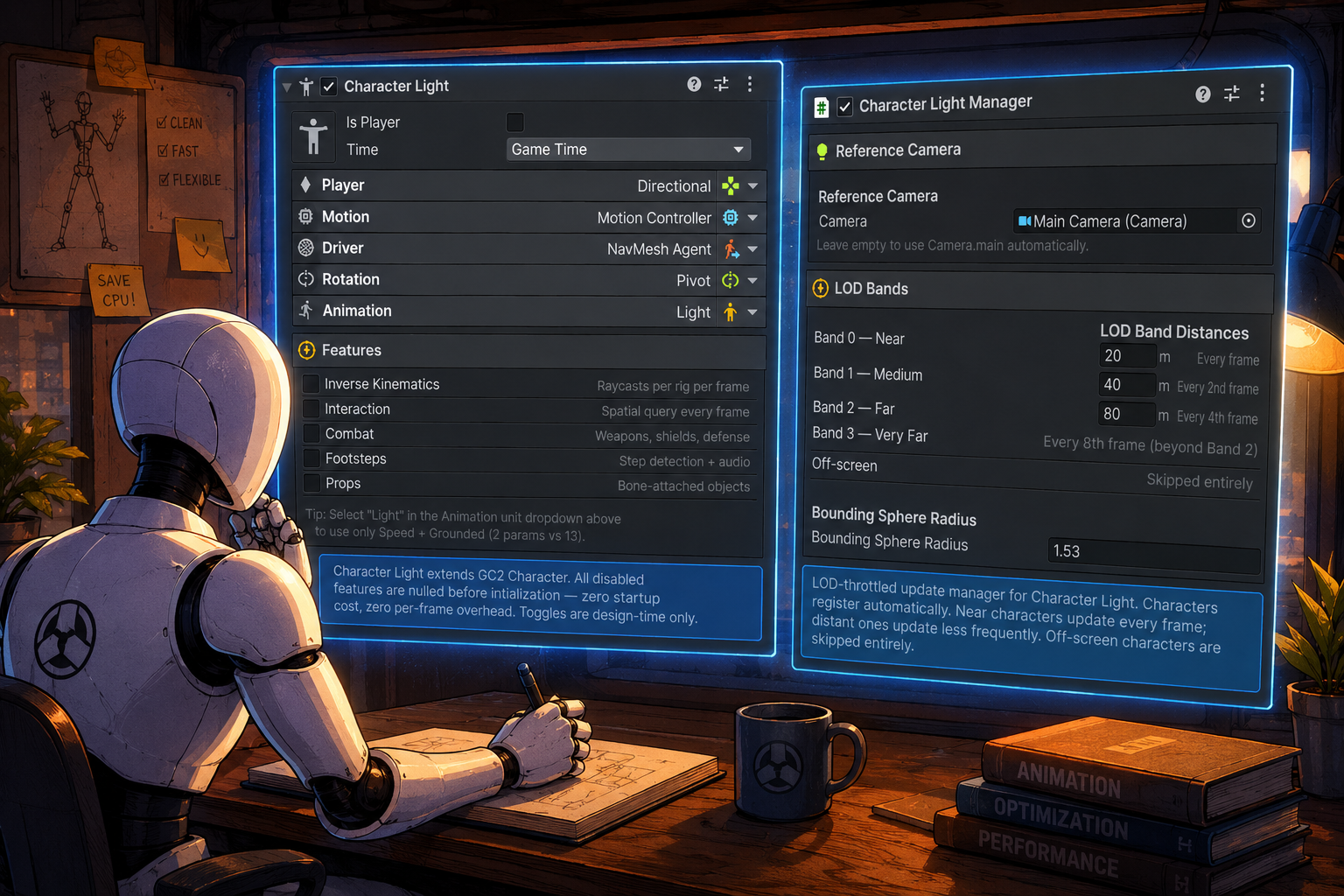
GC2 Light Character takes the fourth road, and it is the one that should have been obvious. Instead of replacing Game Creator 2's Character, it extends it. Character Light is a drop in stand in that strips the per frame work down to what a background NPC actually needs, while still registering as a real GC2 Character to the rest of your project.
That last part is the whole trick. GetComponent<Character>() still returns it. Your existing triggers, conditions, and actions do not know or care that they are talking to a lighter object. Move To, Follow, Stop, and Face Direction all work without modification. You are not maintaining a second NPC system with its own rules. You are running the same visual scripting graphs against characters that cost a fraction of what they used to.
Compatibility that was clearly earned the hard way
You can tell a lot about a Unity tool from its changelog, and this one reads like somebody actually shipped a crowd. The animation layer drives GC2 locomotion blend trees with the directional parameters they expect rather than a single speed magnitude, because the naive version silently does nothing. Mannequin references auto resolve by walking up from the Animator to the direct child of the character root, matching Game Creator 2's own convention, and the assignments are recorded through Unity's undo system so they survive serialization instead of quietly detaching and dropping your NPC through the floor.
Combat compatibility got the same treatment. GC2's Shooter and Melee modules both reach into Dash, Combat, and Busy state without null guards, so those pieces are kept alive even when the corresponding features are switched off. That is an unglamorous detail, and it is exactly the kind of thing that turns a promising optimization into a crash log if nobody handles it.
Who should actually be looking at this
This is a targeted tool, not a general purpose speedup, and it is worth being honest about the fit. It earns its place if you are building a town, a market, a festival, a city builder, a survival settlement, a strategy game with visible units, or anything where the world is supposed to feel populated. If your game has six NPCs total, you do not need it. If your game has six hundred, you needed it last month.
It is also a good match for anyone already invested in the Game Creator 2 ecosystem who does not want to leave it. The appeal of GC2 is that designers can build behavior without opening an IDE. Hand rolling a custom NPC controller throws that away for the exact characters you have the most of. Keeping your crowd inside GC2's visual scripting, just cheaper, preserves the reason you picked the framework.
A sane way to roll it in
Do not convert everything at once. Split your cast by role first. Your player, your quest givers, your combat enemies, and anyone who needs the full feature set stay on the standard Character. Everyone in the background, the ambient walkers, the shoppers, the patrol filler, the crowd extras, moves to Character Light.
Profile before and after with the same scene and the same camera position, and record the numbers. Then push the crowd count up until it hurts again, because knowing your real ceiling is more useful than knowing you got faster. Most teams discover the budget they were fighting over was never about the number of NPCs at all. It was about how much each one was allowed to think.
Worth the price of a coffee run
At 12.99 dollars, this sits in the category of tools where the decision is not really financial. If it saves you one weekend of writing and debugging a parallel NPC system, it has paid for itself several times over, and you get the compatibility fixes somebody else already found the painful way.
If your town is emptier than you want it to be because the frame rate said so, take a look at GC2 Light Character on DevLoot and see whether your crowd problem is actually a crowd problem, or just a character controller doing far more work than the scene ever asked for.