
Modular Environment Kits: How to Build Levels 10x Faster
Here's a thing that blows beginners' minds when it clicks: that sprawling dungeon in your favorite indie game probably came from like fifteen reused pieces. A wall, a corner, a floor tile, a doorway, a couple of props. Snapped together a few hundred times. That's modular environment design, and it's the single biggest force-multiplier for building worlds when you don't have a 40-person art team.
If you're still trying to model or buy every room as a unique chunk, you're doing it on hard mode. Let's fix that.
Modular makes level design feel like LEGO.
What "modular" actually means
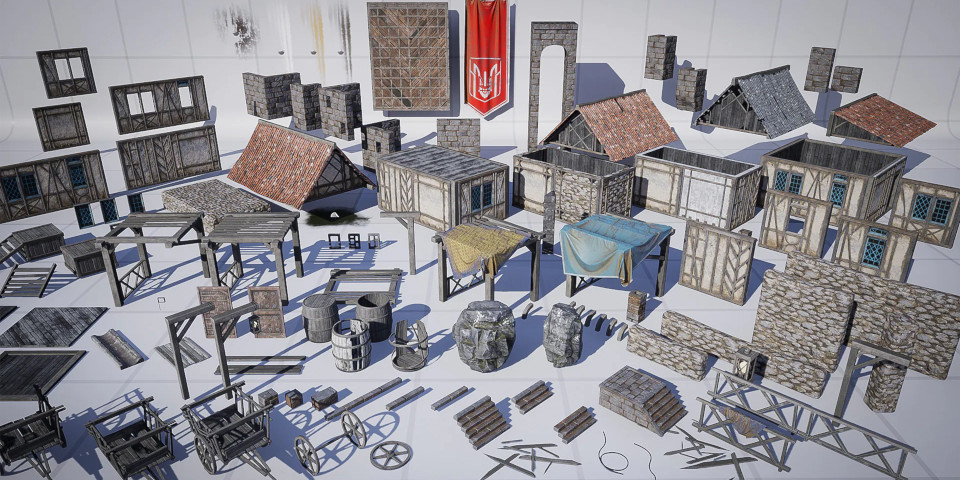
Image: via cgchannel.com
A modular kit is a set of pieces built to snap together on a consistent grid. Instead of one giant "dungeon room" mesh, you get walls, floors, ceilings, corners, doorways, stairs, columns, and trims. All sized to standard units (say, 2m or 4m) so they connect seamlessly in any combination.
The magic is reuse. Build a small library once, then assemble unlimited unique-feeling spaces from it. The same twenty pieces become a cramped corridor, a grand hall, or a ruined courtyard depending on how you arrange them.
Trees, houses, walls, interiors. These environment building blocks are among the most-searched asset types out there, precisely because everyone building a game needs them and modular is how you make them go far.
Why it's such a massive time-saver
A few reasons it beats unique modeling:
Speed. Snap, duplicate, rotate, repeat. You build a level in an afternoon that would take weeks to model bespoke.
Consistency. Everything shares the same style, scale, and texel density automatically, because it all came from one kit. No mismatched seams.
Performance. Reused meshes mean the engine can instance them efficiently, and shared materials keep draw calls and memory down. A level built from twenty repeated pieces is far lighter than two hundred unique ones.
Iteration. Don't like a room? Tear it down and rebuild in minutes. Bespoke geometry makes you precious about changes; modular makes level design feel like LEGO.
What separates a good kit from a frustrating one
Not all modular kits are created equal. Before you buy, look for:
True grid snapping. Pieces must align cleanly on a consistent unit. If the pivots are off-center or the dimensions don't match the grid, you'll spend your life nudging things by 0.03 units and fighting gaps. This is the #1 thing that makes or breaks a kit.
Sensible pivot points. Pivots should sit where you'd naturally snap from (corner or edge, consistently), not floating in the middle of the mesh.
Enough variety to avoid the "tiled" look. The risk with modular is obvious repetition. Good kits include variation pieces. Different wall damage, trim options, decals, and props. So your reuse doesn't scream "copy-paste."
Matching props and trims. A kit that's just walls and floors feels sterile. The trims, pillars, debris, and set-dressing are what sell the space as real.
Clean game-ready specs. Same rules as any asset. Proper PBR maps, optimized polycounts, LODs if you'll build big. Modular pieces get placed a lot, so per-piece efficiency multiplies hard.
A few workflow tips
Once you've got a good kit:
- Turn on grid snapping in your engine and match it to the kit's unit. This is non-negotiable. It's the whole point.
- Block out with the kit first, dress later. Lay down the architecture, get the space feeling right, then add props and lighting.
- Break repetition with rotation, props, and lighting, not by buying more unique meshes. A torch here, some rubble there, a shaft of light. That's what hides the reuse.
- Lean on your prop library to make identical rooms feel different.
Where to grab one
Modular kits are one of the best-value purchases for any level builder. High reuse, immediate payoff, sets your whole visual tone. The thing to nail when buying is that the kit is actually modular (clean grid, good pivots) and not just a bag of meshes labeled "modular" for the search traffic.
On DevLoot, environment and modular kits are a core category, with the style and engine-compatibility info up front so you can pick a kit that snaps cleanly into your project and matches the look you're going for. Buy one solid kit, learn to snap, and watch your level-building speed go through the roof.
Building a world? Browse modular environment kits on DevLoot →
Related reading
Hero image: via assets.superhivemarket.com