Unity Addressables Explained: Stop Using the Resources Folder and Fix Your Memory
The Resources folder is why your game takes eight seconds to boot
Here is the pattern almost every Unity project falls into. You need a prefab at runtime, you drop it in a folder called Resources, you call Resources.Load, and it works. So you do it again. And again. Six months later your Resources folder is a junk drawer with 400 files in it, your startup time crawls, and your memory usage on device is double what it should be. The kicker is that Unity loads and serializes metadata for everything in Resources at startup whether the player ever sees those assets or not.
Unity Addressables is the system that fixes this, and it has been the official answer for a while now. The 2.x line (2.9 as of mid 2026, targeting Unity 6) is stable and no longer the finicky beta people remember from a few years back. If you have been avoiding it because the docs read like a tax form, this is the plain version.
What Addressables actually are
An Addressable is any asset you have tagged with a string key called an address. Once a prefab, texture, audio clip, or scene is marked addressable, you can ask for it by that address from anywhere in your code, and the system finds it, loads its dependencies, and hands it back. The asset can live inside your build or on a remote server (a CDN, an S3 bucket, wherever), and your gameplay code does not care which. That is the whole pitch: you stop hard-referencing assets and start asking for them by name, loaded only when you need them and released when you do not.
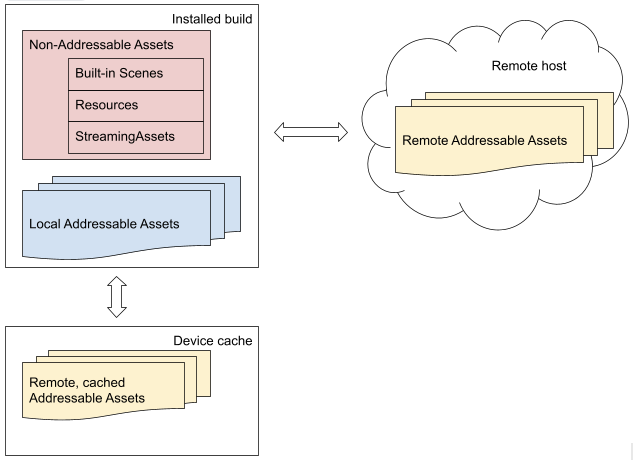
How addresses map to assets in the Addressable system. Credit: Unity Addressables documentation.
The practical win is loading. Instead of everything sitting in memory from frame one, you pull the boss prefab into memory when the player opens the boss door, then release it when the fight ends. Your baseline memory footprint drops to whatever is actually on screen.
Why the Resources folder quietly hurts you
Three things go wrong with Resources at scale. First, load-time cost: Unity builds a lookup for the entire Resources tree at startup, so the more you cram in, the slower every launch gets. Second, memory: assets referenced directly (a public field pointing at a prefab, for example) get pulled into memory with the scene that references them, so a single fat prefab drags its whole texture and mesh chain along for the ride. Third, duplication: the same texture referenced from two places can end up baked into your build twice. Addressables give you reference counting and dependency tracking that make all three of those problems visible and fixable.
The core workflow, minus the mystery
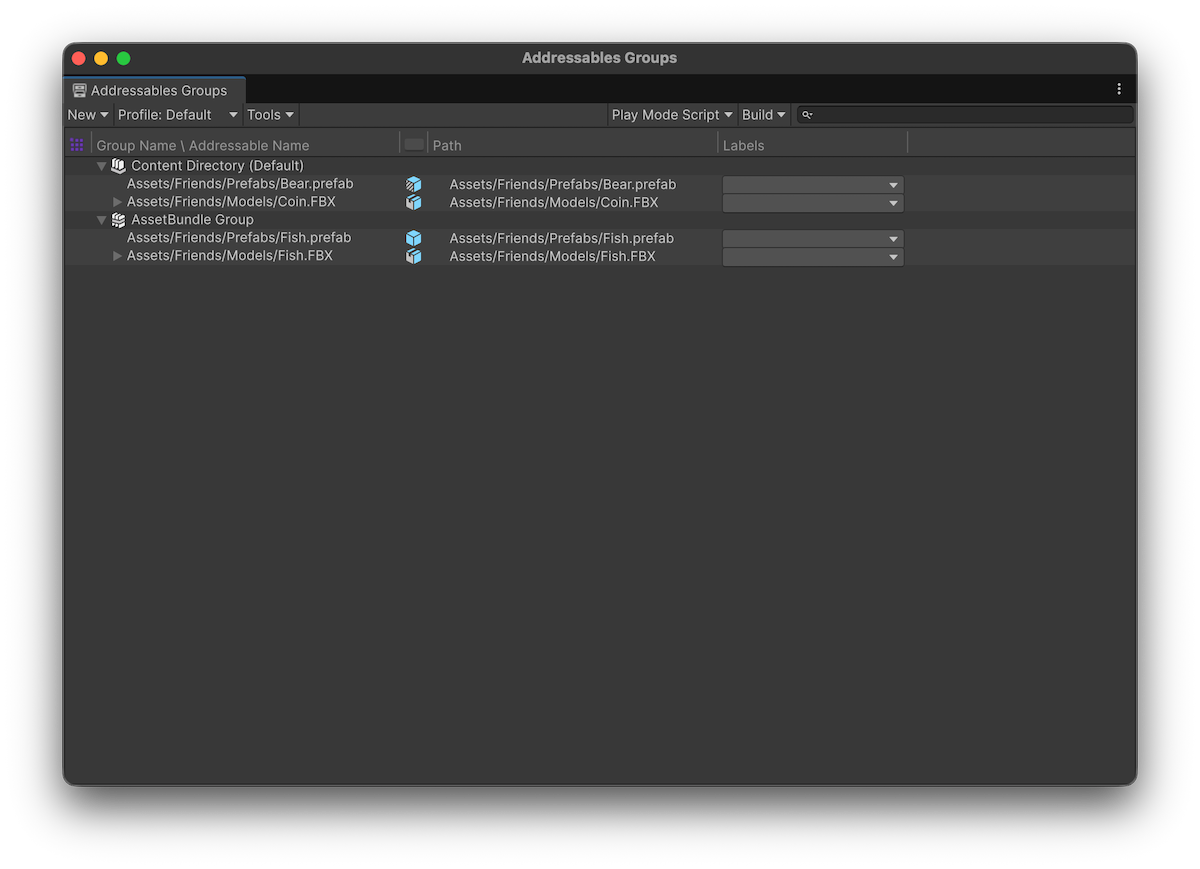
Install the Addressables package from the Package Manager, then open Window, Asset Management, Addressables, Groups. Tick the Addressable checkbox on any asset in its inspector and it joins a group. Groups are just buckets that decide how assets get packed into bundles and whether they ship local or remote.
Loading looks like this:
var handle = Addressables.LoadAssetAsync<GameObject>("Boss_Golem");
await handle.Task;
GameObject prefab = handle.Result;
Instantiate(prefab);

// later, when you are done with it
Addressables.Release(handle);
Everything is asynchronous by design. The first time you request an asset the system may have to download or decompress a bundle, so you get back a handle you can await or hook a completed callback onto. No more synchronous stalls hidden inside a Resources.Load call on the main thread.
Reference counting is the part that bites everyone
This is where people get burned, so read it twice. Every load increments a reference count on the asset and its dependencies. Every Release decrements it. When the count hits zero, the bundle unloads and the memory is freed. If you never release, you have just built a slower memory leak than the one you were trying to fix.
The gotcha is that loading and instantiating count differently. If you call LoadAssetAsync once and then Object.Instantiate five times, the asset ref-count went up by exactly one, so you release the one handle when all five instances are gone. But if you use Addressables.InstantiateAsync five times, the ref-count went up by five, and you have to release each instance individually with Addressables.ReleaseInstance.
The rule that saves you: whoever increments the count owns releasing it. Mix up load-then-instantiate with InstantiateAsync and you will either leak memory or yank textures out from under a live object.
That last failure mode is the nasty one. If you load a prefab, instantiate it with plain Object.Instantiate, then release the handle while the instance is still alive, the bundle unloads and your object loses its materials and textures mid-scene. Pink meshes everywhere. Keep the handle alive as long as the instance is.
Local content, remote content, and content updates
Groups can be set to build local (packed into the player, available offline, no download) or remote (hosted somewhere and fetched at runtime). Remote is what lets you patch assets or push new content without shipping a whole new build, which is the reason live-service games lean on this system. You do a content build, host the resulting bundles and catalog, and the game pulls updates against the catalog. The tradeoff is real infrastructure: you own the hosting, the versioning, and the cache behavior. For a single-player game that never updates assets post-launch, keeping everything local is completely fine and far simpler.
When you actually need Addressables (and when you do not)
You want Addressables when memory is tight (mobile, Switch, VR), when your project is big enough that loading everything at once is wasteful, or when you plan to push content after launch. If you are shipping a small jam game or a tight single-scene project, the honest answer is that the Resources folder or plain direct references will not hurt you, and Addressables add real ceremony. Do not adopt a content-delivery pipeline to load three prefabs.
If you do go for it, the payoff shows up right next to your other runtime wins. Addressables handles when assets enter and leave memory; techniques like object pooling handle how often you spawn them, and both feed into the broader work of optimizing your Unity game once the profiler starts pointing fingers.
One last practical note. If you buy or download asset packs (whether from the Unity Asset Store, DevLoot, or anywhere else) they usually land in your project as plain assets in folders. Marking the ones you load dynamically as addressable, instead of leaving them in Resources, is a five-minute change that keeps a big pack from inflating your baseline memory. Group them, load them by address, release them when the level ends. Your boot time and your device memory will both thank you.