
Unity ScriptableObjects: What They Are and When to Actually Use Them
You start a project clean. Enemy health lives in the enemy script, the player's move speed lives in the player script, item prices live wherever felt convenient at 2am. Six weeks later a designer wants to nerf the shotgun and buff every grunt by 10 percent, and the only person who can do that is you, in code, recompiling every time. Multiply that across weapons, levels, and dialogue and you have built a game that only one person can balance. That is the exact mess Unity's ScriptableObject is built to clean up, and most tutorials sell it as a "data container" without ever explaining why you should care.
What a ScriptableObject actually is
A ScriptableObject is a serializable Unity type that lives as an asset in your project instead of on a GameObject in a scene. That is the whole trick. A MonoBehaviour has to be attached to something in a scene, it drags around a Transform and all the component overhead that comes with it, and every prefab instance gets its own private copy of whatever data you put on it. A ScriptableObject just sits in your Assets folder as a .asset file, holds data, and can be referenced by anything: prefabs, scenes, other assets. One file, one source of truth.
You define one the same way you define a MonoBehaviour, except you inherit from ScriptableObject and tag it so you can create instances from the editor:
using UnityEngine;

[CreateAssetMenu(fileName = "EnemyStats", menuName = "Game/Enemy Stats")]
public class EnemyStats : ScriptableObject
{
    public string enemyName;
    public int maxHealth;
    public float moveSpeed;
    public float attackDamage;
}
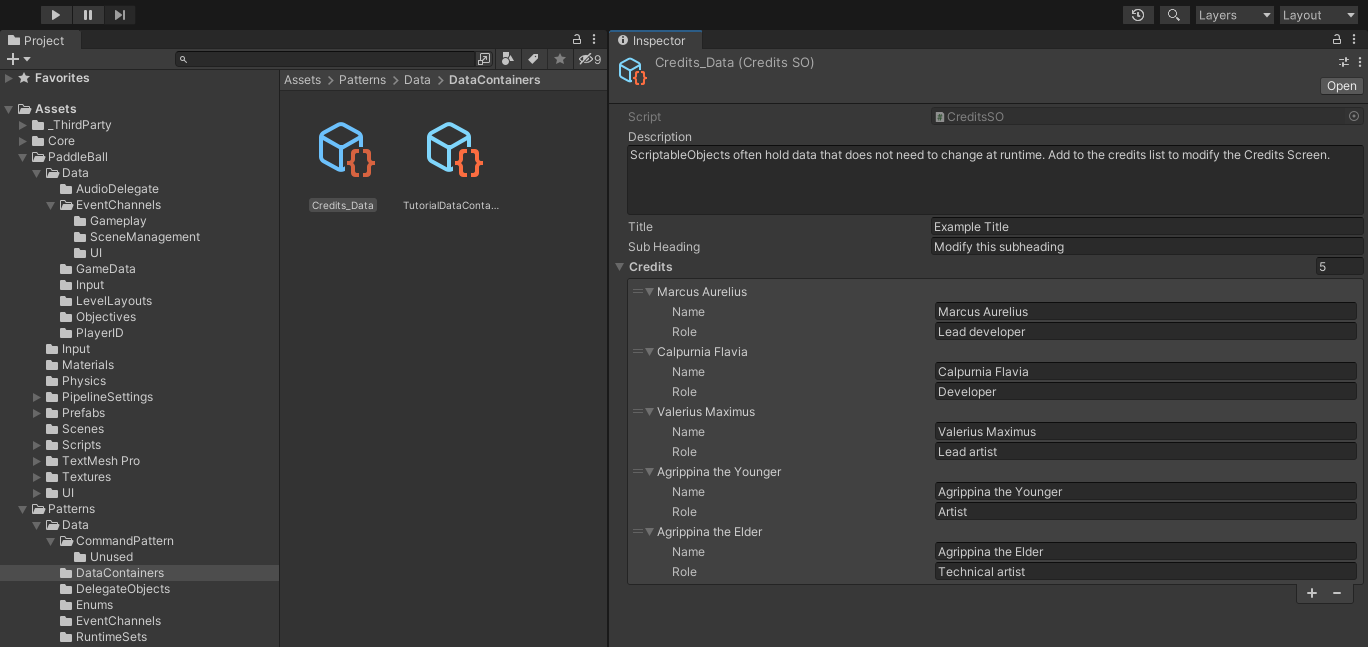
Once that class exists, right-click in the Project window, hit Create, and you get a Game menu with "Enemy Stats" in it. Every click spits out a new asset you can fill in through the Inspector. Now your grunt, your brute, and your boss are three assets a designer can tweak without touching a line of code or asking you to rebuild anything.
The real problem they solve: one copy in memory
Here is the part that matters for performance. Say you are running a strategy game with 400 units that all share the same base stats. If those numbers live on a MonoBehaviour, that is 400 copies of the same data sitting in memory, and 400 places to get out of sync. Point every unit at a single shared ScriptableObject instead and there is exactly one copy. Programmers call this the flyweight pattern, but you do not need the vocabulary to get the win: less memory, and changing "base move speed" in one place updates every unit at once.
That shared-reference behavior is also a quiet fix for a problem that has nothing to do with performance: merge conflicts. When your gameplay numbers live inside a scene or a prefab, two teammates editing the same scene will smash into each other in version control constantly. Move that data into ScriptableObject assets and the scene stops being the dumping ground for everything, which makes merges a lot less painful. If you are still fighting frame drops after tidying your data, that is a separate battle covered in how to optimize your Unity game for better performance.
Treat ScriptableObjects like a database your designers can edit and your programmers can reference. Data in assets, logic in scripts, and the two stop stepping on each other.
When to actually reach for one
ScriptableObjects are not a hammer for every nail, so here is where they genuinely earn their spot:
- Config and game rules: constants, tuning values, difficulty curves. Anything that does not change during play but that you want to tweak without hunting through code.
- Character and enemy attributes: health, damage, speed. This is the classic case, and it hands balancing over to designers.
- Inventory and items: names, descriptions, icons, prices. Each item is an asset, and adding a new one is a right-click, not a code change.
- Dialogue and narrative: lines, character names, branching paths. Writers can work in the Inspector while you build the system.
- Event channels: a slightly more advanced move where a ScriptableObject acts as a messaging hub so systems can talk without hard references to each other. An inventory can shout "item picked up" and the UI listens, neither one knowing the other exists.
That last one is where ScriptableObjects stop being just storage and start shaping your architecture. Decoupling systems this way pairs nicely with other runtime patterns like object pooling in Unity, since both are about keeping your moving parts from being welded together.
ScriptableObject vs MonoBehaviour, side by side
If you are ever unsure which one you want, the litmus test is simple: does this thing need to exist in a scene and do stuff every frame, or does it just hold data that other things read? Behavior goes on a MonoBehaviour. Data goes in a ScriptableObject. An empty ScriptableObject is measurably lighter than an empty MonoBehaviour because it is not carrying the GameObject and Transform baggage.
ScriptableObject versus MonoBehaviour serialization, side by side. Credit: Unity, "Separate game data and logic with ScriptableObjects".
The traps nobody warns you about
ScriptableObjects have two gotchas that will burn you if you learn them the hard way, so learn them now.
They are not a save system. In the editor, when you tweak an asset's values they persist, which fools people into thinking ScriptableObjects remember changes. They do not, at least not in a shipped build. In a standalone player you can only read from ScriptableObject assets, not write to them. If a player earns gold or unlocks a level, that state has to go into an actual save file (JSON, binary, PlayerPrefs for small stuff). Use ScriptableObjects for the starting values, not the running total.
Editor writes need SetDirty. If you change a ScriptableObject's value from an editor script rather than by hand in the Inspector, Unity will not always know the asset changed, and your edit quietly evaporates when you restart the editor. The fix is to call EditorUtility.SetDirty(yourAsset) after you change it so the serialization system flags it to save. This one costs people hours because it fails silently.
The other subtle thing: because it is one shared copy, if you write to a ScriptableObject at runtime in the editor, that change sticks to the asset on disk between play sessions. Great for tuning, dangerous if you assumed you were editing a throwaway instance. When you truly need a disposable copy at runtime, make one with Instantiate or CreateInstance and mutate that.
The bottom line
ScriptableObjects are one of the few Unity features that make your code cleaner, your memory lighter, and your designers happier all at once, which is why they show up in nearly every serious Unity project. Start small: pull your enemy stats or your item definitions out of your MonoBehaviours and into a few assets this week. Once you feel how nice it is to balance a game from the Inspector instead of the code editor, you will start seeing candidates everywhere. And when you go shopping for prebuilt systems on DevLoot, you will notice the well-built ones lean on this pattern too. That is not an accident.