Where to Buy Game-Ready 3D Characters for Unity (Without Getting Burned)
Everybody's first character purchase goes the same way. You find a gorgeous render, you buy it, you drag the FBX into Unity, and... the thing imports as a static lump with no bones, a 4-material mess, and textures that look like they were baked in 2009. Welcome to the club.
"Game-ready" gets slapped on listings like a sticker, and on a 3D character it has to mean a lot of specific things or the model is just a pretty paperweight. So before we talk about where to buy, let's talk about what you're actually checking for. This is the stuff that saves you a refund request and an afternoon.
The cheap one isn't cheap once you count the hours.
What "game-ready character" has to actually mean

Image: via Fiverr
A character is a different beast from a prop. A barrel just needs to look good and sit there. A character needs to move, and that's where most of the cheap ones fall apart.
Here's the checklist I run before buying anything with a skeleton:
It's rigged, and rigged in a standard you can use. For Unity specifically, you want a humanoid that maps cleanly to Unity's Avatar system. Unity processes a humanoid rig in about 5-30 seconds and gives you a green "muscle" config if the bone hierarchy is sane. If the seller says "Mixamo-compatible" or "Unity Humanoid," that's a good sign. It means you can pipe in animations from anywhere instead of being stuck with whatever clips shipped with it.
The polycount fits its job. Don't get hypnotized by triangle counts. Get the right budget for the role. Rough real-world numbers people actually ship with: a hero character runs ~20K-80K triangles on PC/console, an NPC sits around 10K, and a mobile hero stays in the 5K-15K range. A 300K-triangle "low-poly stylized hero" is a red flag that nobody optimized it.
PBR textures, metallic-roughness workflow. This is the default standard in Unity now. You want to see the maps listed: albedo (base color), metallic, roughness, normal, ambient occlusion. If the listing only shows one diffuse texture, the thing will look flat the second you put it under real lighting.
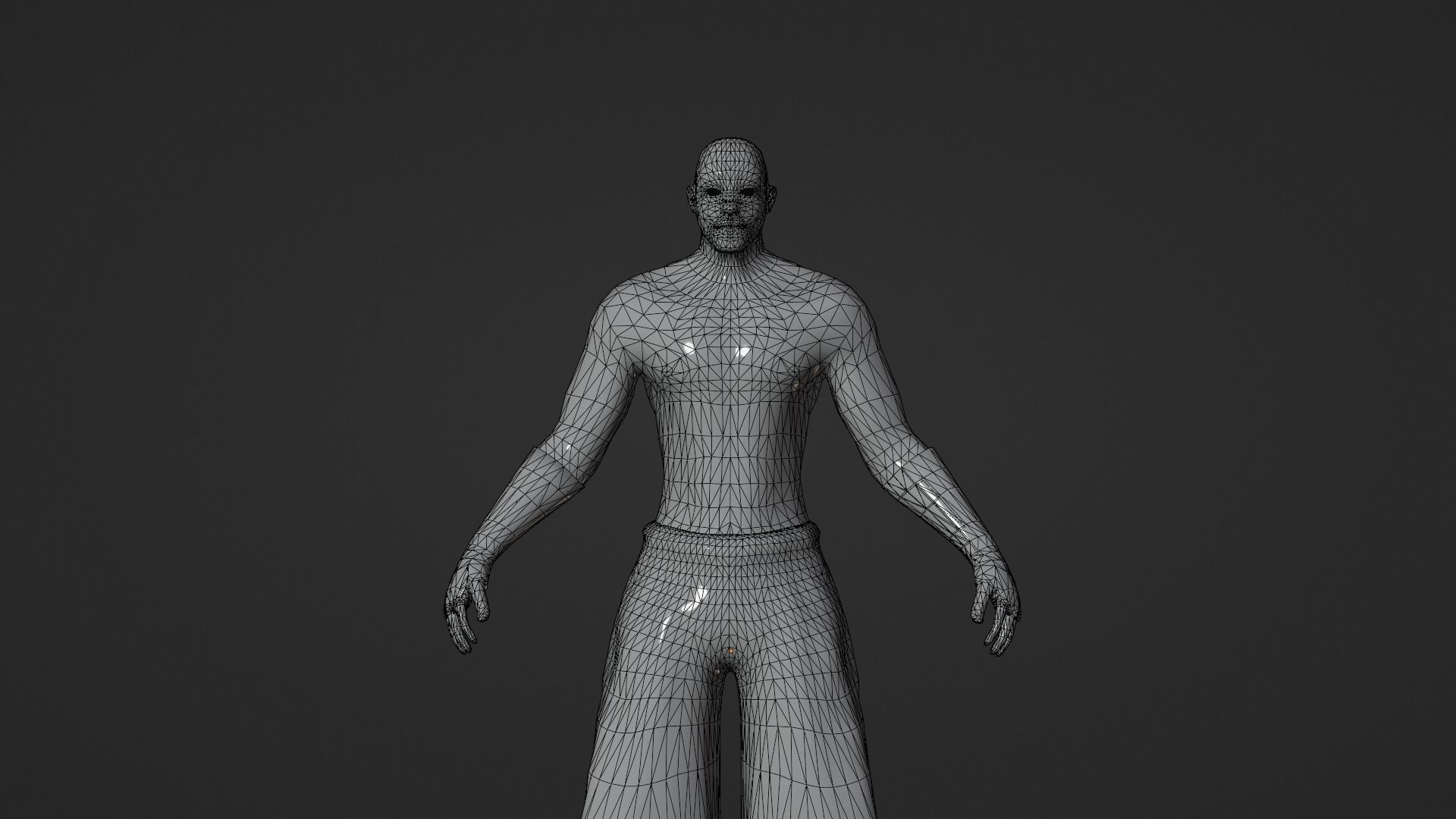
Clean topology and UVs. Quad-based mesh, no overlapping UVs, proper edge loops around joints (elbows, knees, shoulders) so it deforms without folding into spaghetti when it bends. You usually can't see this from a hero render. Which is exactly why you want a wireframe shot in the gallery.
LODs, if you're spawning more than a few. A proper character pack ships LOD0/LOD1/LOD2 (full, ~50%, ~25%) so Unity's LOD Group can swap detail by distance. Not mandatory for a single main character, non-negotiable if you're filling a town with NPCs.
How to vet a listing in 60 seconds
You can tell a serious seller from a flipper by the gallery. The signals you want:
- A wireframe render (they're proud of the topology).
- A texture sheet or map breakdown.
- A turntable or, ideally, the model running an actual animation clip.
- An explicit engine + format note: FBX, Unity Humanoid, texture resolution.
- A clear license: can you ship it in a commercial game? One seat or studio-wide?
If all five are missing and it's just one beauty shot on a gradient background, assume the worst and move on. The good ones tell you everything because they know buyers got burned before.
Where to look
The big general marketplaces (the Unity Asset Store, Fab, CGTrader, Sketchfab) all have character sections, and they're fine. But they're enormous, and "character" is one of the single most-searched 3D keywords out there, so you're digging through tens of thousands of results, a lot of it arch-viz mannequins and AI soup-mesh that'll never animate.
That's the whole reason a focused, game-first marketplace exists. On DevLoot, character listings are meant to carry the stuff that matters. Rig type, polycount, included maps, engine compatibility. Up front, so you're not reverse-engineering whether a model is usable from a single render. And because creators get verified and listings can carry Alpha/Beta and AI-assisted badges, you know what you're getting before checkout, not after.
The buy-it-once mindset
One last thing, because it's the most expensive mistake. A character is rarely a one-off purchase. It's the start of a pipeline. Once you commit to a rig standard, your animations, your retargeting, your gear-swapping, and your IK setups are all built around it. Switching rigs later means redoing all of it.
So spend the extra ten minutes up front. Buy the one with the wireframe shots and the clean Humanoid rig, even if it costs a bit more than the bargain-bin version with the gorgeous thumbnail and zero technical info. The cheap one isn't cheap once you count the hours.
Find the wireframe. Check the rig. Read the license. Then buy. That's the whole game.
Browsing for your next protagonist? Check out the character assets on DevLoot →
Related reading
Hero image: via CGTrader