
Game Audio Middleware in 2026: FMOD vs Wwise vs Unity's Built-In Audio
Your game sounds fine. A footstep clip, a sword swing, a menu blip, a music loop, all hooked to Audio Sources, and nobody complains in a two minute playtest. Then someone plays for forty minutes and tells you it sounds cheap. They cannot say why. The reason is they just heard the same 0.4 second footstep about four thousand times at the same volume and pitch, and their brain filed the whole soundscape under "fake."
That is the problem game audio middleware exists to solve. It is also a problem you can solve without middleware if your game is small enough. Working out which side of that line you sit on saves you either a month of learning or a year of regret.
What audio middleware actually does
Middleware sits between your audio files and your engine. Instead of a programmer writing "play clip 7 at volume 0.8," a sound designer builds an event called footstep that already knows how to pick one of nine variations, randomize pitch by a few cents, duck the music, swap the sample set by surface type, and attenuate over distance. The game just says "footstep." Everything else lives in the audio tool, editable without touching code.
The other half of the value is live update. Both FMOD and Wwise let a designer attach to a running build over the network and edit the mix while someone plays. No recompile, no "can you make this quieter and send me a new APK."
Unity's built-in audio is better than its reputation
Most "you need middleware" advice online was written before Unity 6, and it shows.
The Audio Random Container is the big addition: an asset holding a list of clips plus rules for how they play. Sequential, shuffle, or random, with volume and pitch randomization, an "avoid repeating last N" setting, and an automatic trigger firing on a pulse or an offset. That is the footstep problem above, solved with an asset instead of a script, and it sits behind the normal AudioSource.Play API so nothing else changes.
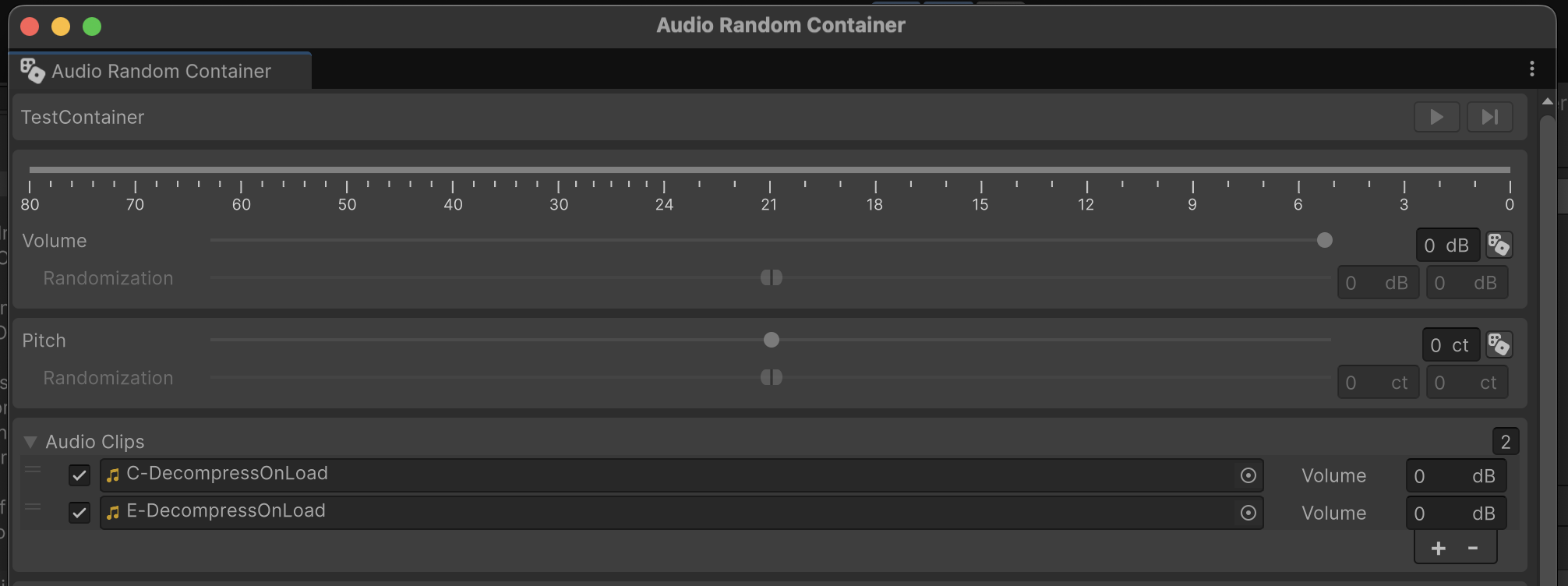
Unity 6's Audio Random Container inspector. Screenshot via Game Torrahod.
Pair it with the Audio Mixer, which has been around for years and is capable: groups, effect chains, snapshots you can blend between, and exposed parameters you can drive from script. Ducking music under dialogue, muffling everything underwater, sidechaining explosions against the score. All of it works with zero middleware. If you are already tuning how your game feels moment to moment, mixer snapshots belong in the same pass.
Where the built-in system runs out
It runs out at complexity, not at quality. Specifically:
- No parameter driven events. Wwise RTPCs and FMOD parameters morph one event continuously against a game value: engine RPM, player health, distance to the boss. In Unity you rebuild that in C# every time.
- No live editing against a running build. Back to the change, rebuild, listen cycle.
- Interactive music is on you. Beat aligned transitions, stingers, vertical layering. Both middlewares ship this. Unity ships
PlayScheduledand good luck. - Weak authoring ergonomics at scale. Audio Random Containers are created one at a time by hand, and the class is internal, so you cannot generate them from an editor script. Three hundred sounds with three variations each is a long afternoon.
FMOD versus Wwise, honestly
FMOD Studio is the indie default, deservedly. The event editor looks and behaves like a DAW timeline, so a musician or sound designer is productive in it on day one. The Unity and Unreal integrations are well maintained, and the workflow is friendlier when one person wears the audio hat part time.
Wwise is the AAA standard, shipped on Cyberpunk 2077, Death Stranding, Overwatch, Rainbow Six Siege, Genshin Impact, and a few hundred more. Its spatial audio, sound propagation, and profiling go deeper than FMOD's, and its structure (Actor Mixer hierarchy, States, Switches, RTPCs) is built for thousands of sounds and a real audio team. It is also noticeably harder to learn, and its concepts do not map onto anything you already know.
Pick FMOD if audio is one of your ten jobs. Pick Wwise if audio is somebody's entire job.
What each one costs in 2026
Both are free to start and both bill on production budget, not on units sold, which surprises people.
Wwise publishes an actual price chart. Indie is free for a production budget up to $250,000, covers every platform, and has no asset limit. Above that, Pro is $7,000 for your first platform plus $3,500 per extra platform (budgets to $2M), Premium is $22,000 plus $15,000, and Platinum is $40,000 plus $20,000. A separate 12 month DLC license applies if you ship post launch content with new audio ($2,000 at Pro). There is also a 1% post launch royalty option and a games as a service option billed monthly. One catch: fully unlicensed Wwise, with no project registered, still caps you at 200 sounds.
FMOD does not charge per platform at all. It is one fee tiered on development budget: Indie, Basic (roughly the $600K to $1.8M band), and Premium above that. Indie is free, with published thresholds sitting around a $500K to $600K budget ceiling plus a cap on annual gross revenue near $200K. Those numbers have moved before, so read fmod.com/licensing before planning around them.
Both exclude the same categories from game pricing: gambling, automotive, advertising, film, location based entertainment, robotics, and industrial simulation. Building a training sim rather than a game puts you on a different price list.
Unreal and Godot change the math
On Unreal the calculation is different. MetaSounds is a first party procedural audio graph baked into the engine, strong enough that plenty of shipped titles never add middleware at all. Reach for Wwise or FMOD there when you need the profiling and the mix workflow, not because the engine cannot make a good sound. Godot has audio buses with effects, a decent 3D setup, and community FMOD bindings: thinnest of the three out of the box, and the one where a small project feels least punished.
How to actually choose
- Solo dev, under 200 distinct sounds, no interactive music. Stay in the engine. Audio Random Containers and mixer snapshots carry you further than you expect, and you ship sooner.
- Small team with one person who cares about audio. FMOD. Free at your budget, fast to learn, and live update is the biggest quality of life win available.
- Funded project, dedicated sound designer, complex spatial or music systems. Wwise. Also Wwise if you are hiring, because experienced audio people already know it.
- Console ports on the roadmap. Price both. Wwise charges per platform and FMOD does not, and across four platforms that gap is real money.
The same logic that applies to picking a netcode stack applies here: switching later costs far more than thinking about it for an afternoon now.
The parts nobody warns you about
Middleware adds a build step. FMOD banks and Wwise SoundBanks have to be generated and committed or built in CI, and a stale bank is the most common "why is there no sound in the build" bug on any team using either. Budget an afternoon for the pipeline.
Watch your load types too. In Unity, streaming clips allocate a fixed buffer per concurrent instance (roughly 124 KB in one profiling pass), so ten overlapping streams is ten buffers, while Compressed In Memory clips share one. Streaming is for music, not for gunfire.
Last thing: buy raw source audio. SFX packs shipping uncompressed WAVs drop straight into an FMOD or Wwise project. Packs shipping as a pre-configured engine package with everything bolted to AudioSources need unpicking first. On DevLoot or anywhere else, check the file list before the demo video.
None of this makes a bad sound good. Middleware is a delivery system, not a sound designer. But it is the difference between four thousand identical footsteps and a game that still sounds alive in hour three.