Game Feel in Unity: Wiring Feel Feedbacks Into Game Creator 2 Visual Scripting
Nothing is broken, and that is the problem
There is one kind of playtest note that ruins a whole week, and it never comes with a stack trace. The build runs. The quest chain completes. Then your tester puts the controller down and says the combat feels mushy, or that opening a chest feels like watching a spreadsheet update.
You cannot file a bug for that. There is no error, no null reference, no failing test. The logic is correct and the game is boring to touch. It is almost always the same missing thing: your game is not reacting. A sword connects and the camera sits perfectly still. A crate breaks and the screen does not flinch. Players never consciously notice a single one of these. They notice all of them at once, and they call it "cheap."
Game feel is the fix, and everyone knows it. The trouble is that in Unity, the two best tools for solving it do not natively speak to each other.
Two excellent tools, no shared language
If you build gameplay in Unity without writing much C#, you probably use Game Creator 2. It is the visual scripting layer that knows when things happen: a trigger fires, a condition passes, an action list runs, a character enters a zone, a quest state flips.
If you care about juice, you probably use Feel by More Mountains. Feel is the tool that knows how to make a moment land. An MMF Player stacks feedbacks (camera shake, chromatic aberration, bloom pulse, vignette, time freeze, sound, squash and stretch, haptics) and fires them together in one satisfying hit.
Individually, both are excellent. Together, out of the box, they are two islands. Game Creator 2 has no idea what an MMF Player is. Feel has no idea what a Game Creator trigger is. So you do what everyone does: you write a bridging MonoBehaviour with a public MMF_Player field, drag a scene reference in, expose a PlayIt() method, and call it from a GC2 action. It works. Then you need forty more of them, each with hard references that break the moment the object becomes a prefab variant, and none of them know which character actually triggered the event.
Game feel is not one big feature you build in a sprint. It is fifty small reactions that each take four minutes to wire and zero seconds for a player to notice.
Fifty small reactions times a custom glue script each is not a polish pass. It is a second codebase, and it is the exact thing you bought a no-code toolset to avoid.
What an actual bridge looks like
This is the specific gap that the FEEL Integration for Game Creator 2 package on DevLoot closes. It is a UPM package whose entire job is to make Feel and Game Creator 2 mutually addressable, in both directions, with no glue scripts of your own.
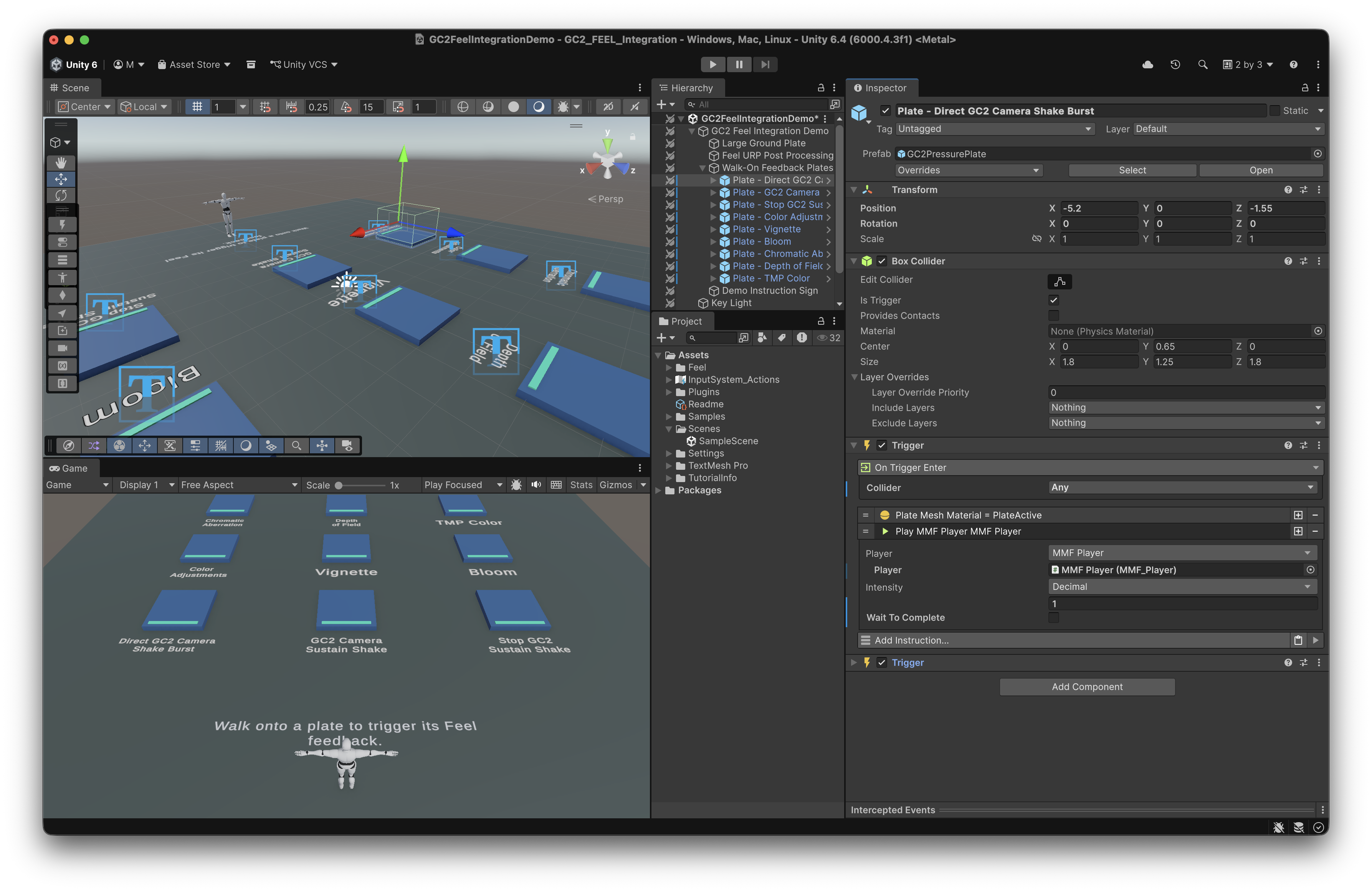
From Game Creator 2, drive Feel
The package adds a Feel category to GC2 visual scripting. From any action list you can play an MMF Player, play one at a position, stop, pause, resume, rewind, skip, set intensity, or initialize it. There are conditions for whether a player is currently playing or initialized, and triggers that fire on Feel's own play, pause, resume, and complete events.
That last part matters more than it sounds. Running GC2 logic when a feedback finishes means you can time a door opening to the end of a screen shake instead of guessing with a wait node.
Crucially, targets are not hard references. The package adds a GC2 MMF Player GameObject property type, so every field uses GC2's normal dynamic property system: Self, Target, a scene reference, a variable, whatever your setup already uses. Your feedback wiring survives being turned into a prefab.
From Feel, drive Game Creator 2
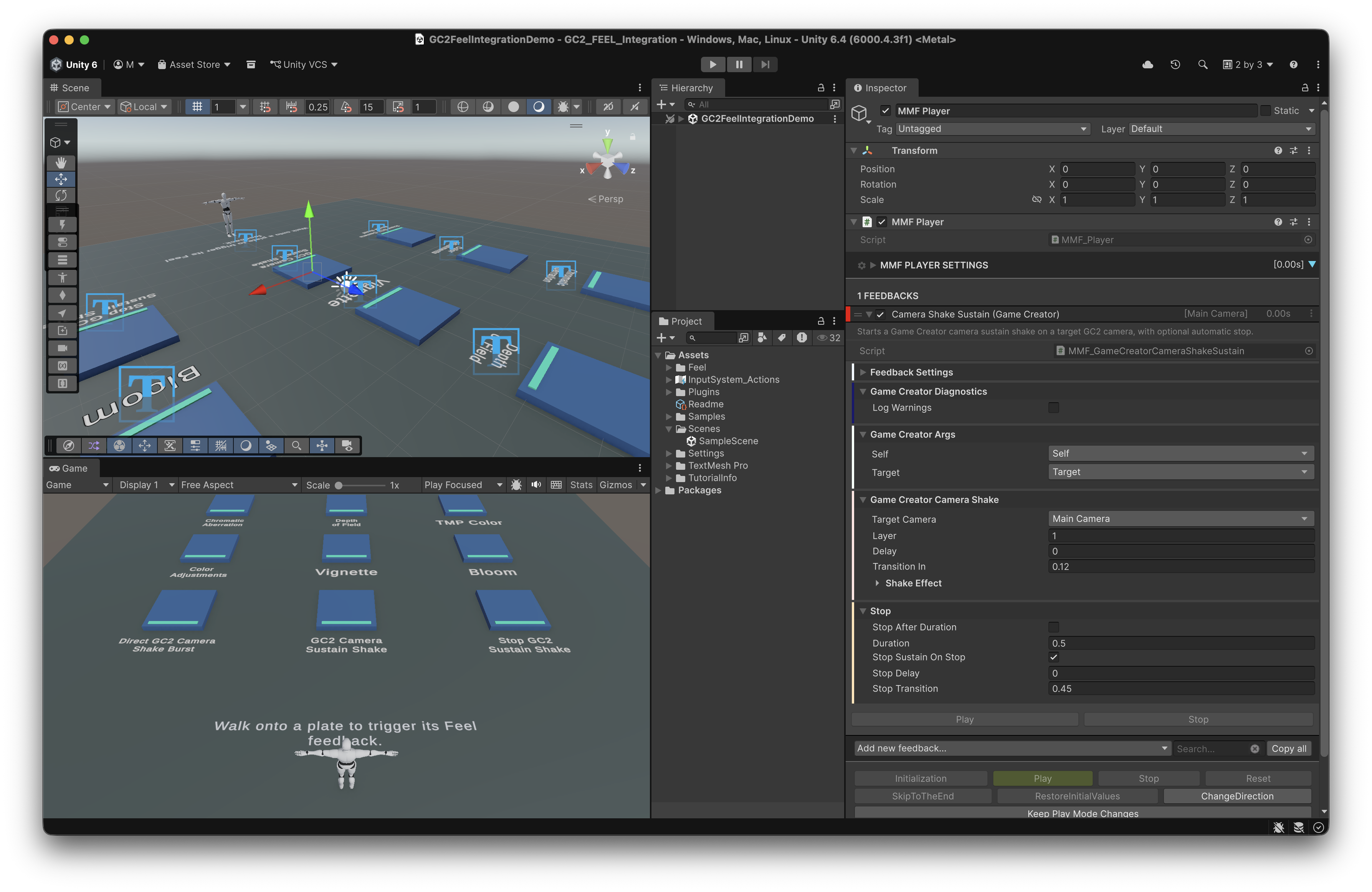
The reverse direction is the half most integrations skip, and it is the more interesting one. The package ships Feel feedbacks that reach into GC2 systems that Feel could never touch on its own:
Game Creator/Camera/Camera Shake BurstandCamera Shake Sustainfor GC2's own camera shake, including its layered sustain shakesGame Creator/Camera/Camera Viewport Pulsefor field of view and orthographic size pulsesGame Creator/Camera/Shot Recoilfor GC2's native first person and third person recoilGame Creator/Camera/Shot Zoom Pulsefor animating zoom on supported shotsGame Creator/Actions,Conditions, andTriggerfeedbacks for running GC2 logic as a step inside a feedback stack
Why bother, when Feel already has camera shake? Because Feel's generic camera transform feedbacks get stomped by GC2's camera and shot systems. If GC2 owns the camera, shaking it from outside is a fight you lose every frame. These feedbacks scale GC2's own shake magnitude by Feel's computed intensity instead, so the two systems cooperate. That is a detail you only get from someone who hit the bug first.
Context travels with the call
The quiet feature that saves the most time is Args passing. When a GC2 instruction plays an MMF Player, the Game Creator feedbacks inside it inherit the calling context. Self stays Self, Target stays Target, all the way down into nested actions, conditions, triggers, camera lookups, and property evaluation.
Practically: one shared "hit reaction" MMF Player prefab can be fired by twenty different enemies, and each one shakes the right camera and runs the right actions on the right character, without a single per enemy variant. Changing the Self or Target field acts as an explicit override, so defaults do the sensible thing and exceptions stay possible.
Who this is actually for
This is for the Unity developer who already owns Game Creator 2 and Feel and has been putting off the polish pass because wiring them together feels like a chore. It is also for the solo dev or small team where nobody wants to own a folder of forty single-purpose bridge scripts.
It is not for you if you do not use Game Creator 2, and it is not a replacement for Feel. This package is plumbing and it is honest about that. It assumes both Asset Store packages are already installed, since Unity Package Manager will not pull them in for you.
A realistic first hour
Install the package, import the included UPM sample called Feel Integration Demo from the Package Manager details panel, and open Scenes/GC2FeelIntegrationDemo.unity. It is a standard GC2 mannequin, a ground plate, and a grid of labeled pressure plates. Walk onto Chromatic Aberration and you get chromatic aberration. Walk onto GC2 Camera Sustain Shake and the camera keeps shaking until you step off.
Every plate is a working, readable example of one instruction or one feedback. Copy a plate, retarget it, and you have your first real integration in about ten minutes.
From there the workflow matches the one you already use for GC2 gameplay, whether that is a Stardew style fishing minigame in Game Creator 2 or a combat loop: build the logic, confirm it works, then go back and attach a feedback to every moment that deserves one. Turn on the Log Warnings toggle under Game Creator Diagnostics while you wire things up. It reports missing targets and unsupported shot systems at runtime.
The honest limits
MMF Player triggers listen to Feel's event stream, so you have to enable event emission in the target player's Events foldout for GC2 triggers to fire. Shot Zoom Pulse and Shot Recoil only affect GC2 shot types that support those features. Camera Viewport Pulse writes the active viewport value directly, which a GC2 shot transition with viewport overrides can replace. The package was built and verified against Unity 6000.4.3f1, Game Creator 2 Core 2.18.60, and Feel 5.9.1.
None of those are dealbreakers. They are the caveats you normally discover at 1am on your own, written down in advance.
Worth ten minutes of your evening
Polish separates a project that plays correctly from one people want to keep touching. Most of us postpone it because the setup cost per reaction is too high, not because we do not know what to add. Removing that setup cost is the whole point here, and since the package is free, the only thing you risk is the time it takes to import a sample scene.
If your GC2 project is functional but flat, grab FEEL Integration for Game Creator 2 on DevLoot, import the demo scene, and spend one evening attaching feedbacks to the ten moments players touch most. Then, once it feels right, go read up on keeping your Unity game fast, because juice has a frame cost and it is better to know that going in.