In-Game Calendar for Unity: World Time, Seasons and Weather Without the Rewrite
Every project that involves time eventually hits the same wall. You start with a float called gameTime, you increment it in Update, and for about a week that feels fine. Then the design doc grows. The shop should close at night. The harvest festival happens on day 24 of Winter. Autumn needs rain more often than Summer does. The player wants to open a calendar and see which day the wedding lands on. Suddenly that one float is being read by eleven scripts, three of which disagree about whether a day is 24 minutes or 20.
This is one of the quieter causes of scope creep in Unity projects. Time is not a feature, it is a dependency. Once your NPC schedules, your weather, your quests, and your UI all need to agree on what day it is, you are not writing a clock anymore. You are writing a calendar system, a simulation loop, a save format, and a UI layer, and you are doing it in the middle of building your actual game.
Why a "simple" in-game clock keeps growing
The trouble is that each new requirement looks tiny in isolation. Adding months means you need month lengths. Custom month names mean your date math cannot rely on System.DateTime anymore. Scheduled events mean something has to fire callbacks on day boundaries. Persisting across scenes means a singleton, and a singleton means rewiring references when a new scene loads. Saving means serializing not just the date but the clock speed, the pause state, the current weather, and how much of that weather is left.
None of those steps is hard. Together they are three weeks you did not plan for, and the result is usually fragile because it grew by accretion instead of design. Anyone who has shipped a life sim or a survival game knows the specific pain of a save file where the date restored correctly but the weather did not, so the player loads into a sunny blizzard.
Time systems fail the same way every time. Not with a crash, but with two systems quietly disagreeing about what day it is.
What a proper world time system needs to do
If you list the actual requirements, they are surprisingly consistent across genres:
- One authoritative source of world time that every other system reads from.
- A calendar structure you define, not one inherited from the real Gregorian year.
- Reusable event definitions so the same festival can repeat every year without duplicated data.
- Callbacks on day, month, and year boundaries so gameplay can react.
- Seasons that own their own weather behaviour instead of a giant switch statement.
- A player-facing display that does not require hand wiring twenty text fields.
- Saving that captures the whole time state, not just the date.
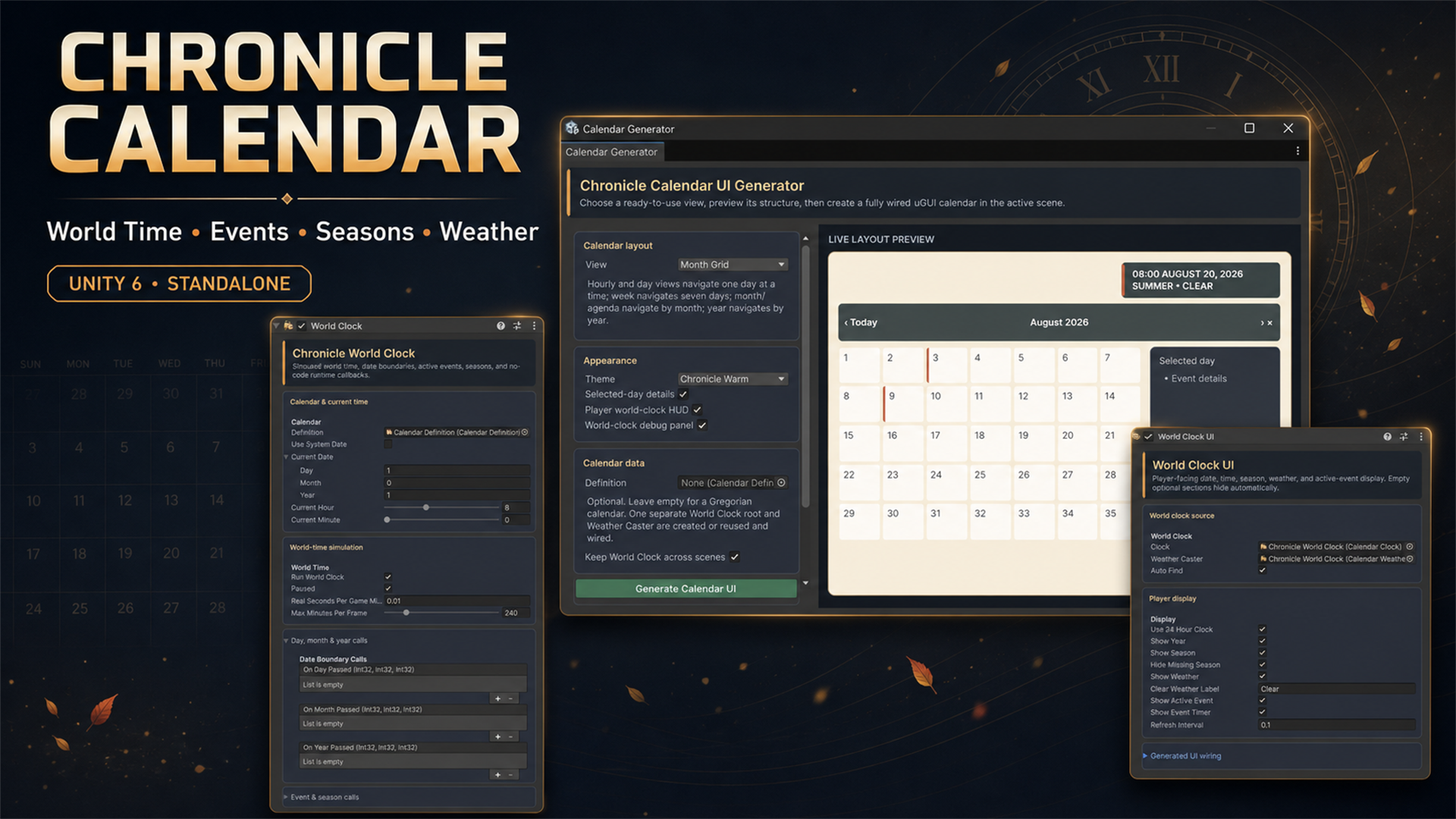
That list is exactly what Chronicle Calendar, the standalone world clock and calendar system for Unity 6, was built to cover. It is worth looking at not because it is new, but because it treats world time as a single system rather than a pile of helper scripts.
Defining a year that belongs to your world
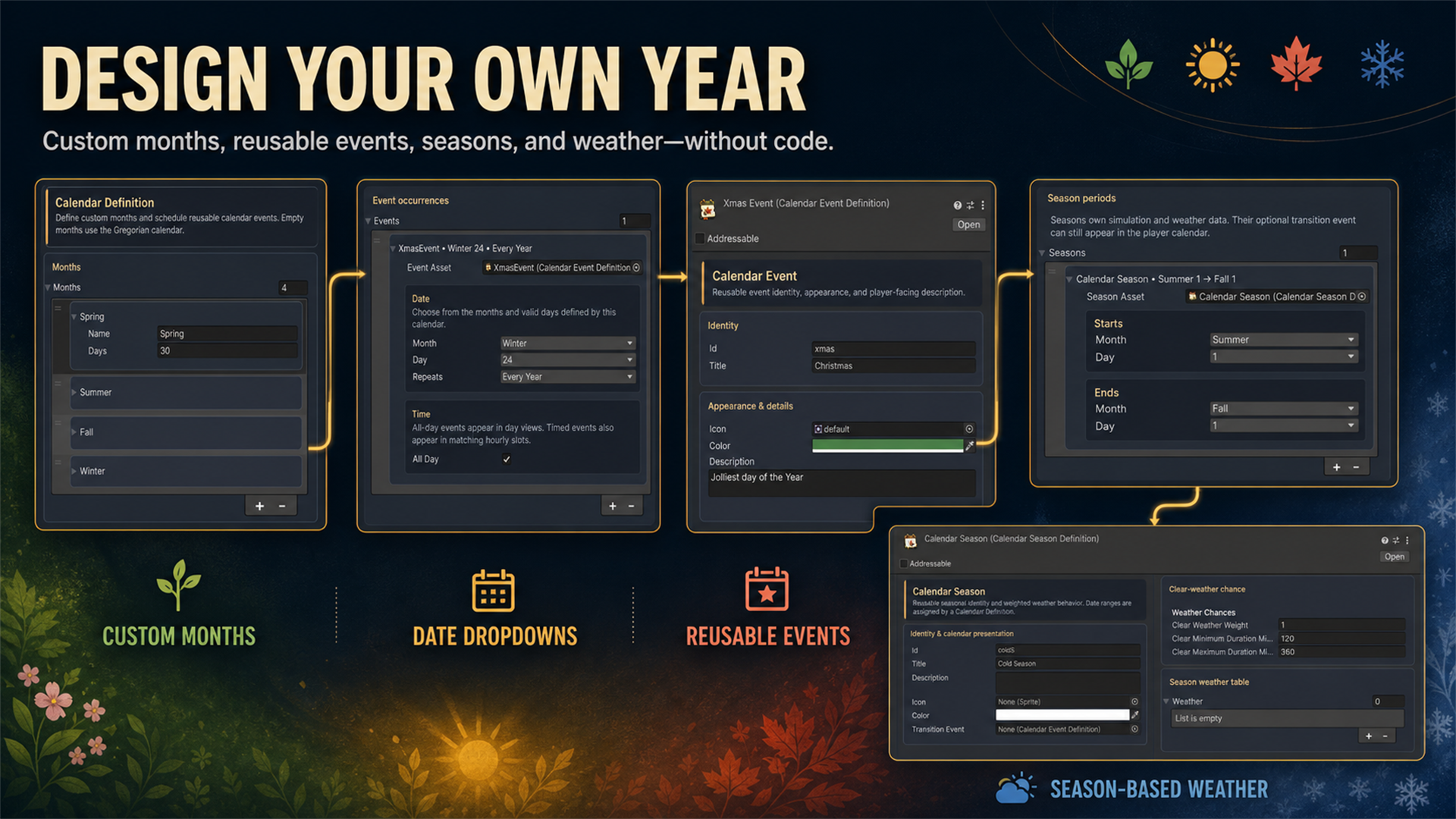
The first thing that stands out is that the calendar itself is data. You create a Calendar Definition asset and fill in months with your own names and lengths. Four seasons of thirty days each, thirteen lunar months, whatever your setting needs. Leave it empty and you get a normal Gregorian year, which is the right default for a modern-day game.
Events are separate reusable assets. You pick a month and a day from dropdowns instead of typing date strings, which removes an entire class of bug where "24/12" means something different depending on who wrote the parser. An event can repeat every year or fire once, run all day or occupy a specific time slot, and it carries its own icon, colour, and player-facing description. That last part matters more than it sounds, because it means the data you author for gameplay is the same data the calendar UI shows the player. There is no second list to keep in sync.
If you have read our piece on when to use ScriptableObjects in Unity, this pattern will feel familiar. Definitions live as assets, systems read them at runtime, and designers can add a festival without touching code.
Seasons that carry their own weather
Seasons are where most homegrown systems get messy. The usual approach is a season enum plus a weather manager full of conditionals, and it works right up until you want Autumn rain to last between two and six in-game hours with a forty percent chance of staying clear.
Chronicle Calendar inverts that. A season is an asset with a date range (including ranges that wrap past the end of the year, which is the case everyone forgets), a clear-weather chance, a weighted table of possible weather types, and minimum and maximum durations. Each weather entry can spawn a prefab holding particles, audio, lights, or VFX Graph effects. VFX Graph is supported but not required, so URP projects without it are fine.
The practical result is that adding a new weather type is authoring work, not engineering work. You drop in a prefab, give it a weight, and the simulation handles selection and duration. That is the difference between a system your team can extend and one only the person who wrote it dares to touch.
The clock that keeps running
Underneath the calendar sits a separate simulated world clock. It has adjustable game-time speed, pause and resume, 12-hour or 24-hour display, and callbacks for day, month, and year boundaries plus active-event timers. It can persist between scenes and reconnect automatically when a new scene loads, which quietly removes the most annoying bug in this whole category: the time system that resets because someone loaded the town scene.
Keeping the clock separate from the calendar interface is the right call. Your NPC schedules, your shop hours, and your quest timers all read from one source, and the calendar UI is just a viewer on top of it. Browsing the calendar as a player does not change the world date, so opening the menu to check when the festival is cannot accidentally skip a day. If you are building routines on top of this, our write-up on NPC daily schedules in Unity pairs with it neatly.
Saving is built in. World time can save automatically, and that includes the date, the clock speed, the pause state, the current weather, and the remaining weather duration. Public save and load calls are exposed for custom menus and multiple slots. If you use Game Creator 2, the optional integration lets the clock hand saving over to GC2 instead, alongside Instructions, Conditions, Events, and Properties.
Getting it into a scene
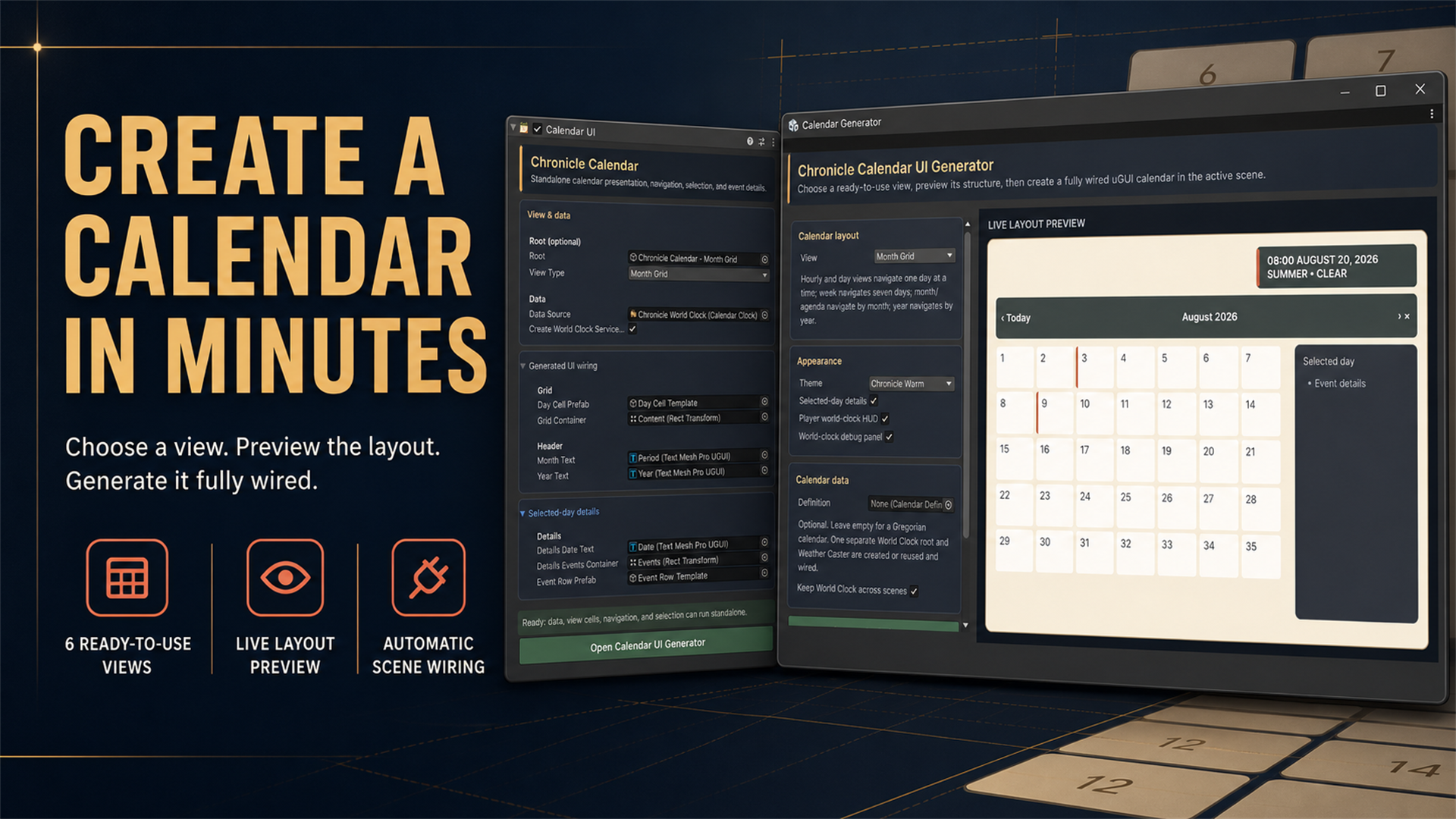
The part that saves the most raw hours is the Calendar UI Generator. You choose one of six views (Hourly Day, Day Summary, Week Planner, Month Grid, Year Overview, Agenda List), preview the layout live in the editor, and generate a fully wired uGUI calendar in the active scene. Missing a Canvas, an Event System, a world clock, or a weather caster? Those get created and connected for you.
There is also a ready-made World Clock UI showing time, date, year, active season, current weather, active event, and elapsed or remaining event time, with sections that hide themselves when there is nothing to show. A separate debug panel gives you a live readout of the same state while you work, which beats sprinkling Debug.Log calls through your date math.
Who this is actually for
If your game does not care what day it is, skip it. But if you are building farming or life sim, cozy games, RPGs with festivals, survival games with seasonal pressure, schedule-driven stories, or shop and NPC routines, this is a system you were going to build anyway. Requirements are Unity 6 or newer, Unity UI, and TextMeshPro 5.0, with no required Asset Store dependencies. Cozy Weather, Cozy Habits, and Game Creator 2 are optional integrations, not prerequisites.
At ten dollars it is priced below a single afternoon of your own time, and the honest pitch is not that it does something impossible. It is that it does something tedious, completely, with editor tooling that keeps designers out of your code. Worth a look if world time is on your roadmap: see Chronicle Calendar on DevLoot.