Unity UI Toolkit vs uGUI in 2026: Which UI System Should You Actually Use?
You open a fresh Unity project, right-click to add a health bar, and Unity hands you two completely different UI systems. One is the Canvas and GameObject setup every tutorial since 2014 uses. The other looks like someone smuggled HTML and CSS into the editor. Forum threads will tell you each one is dead, or unfinished, or the future. Most of those threads are out of date, because UI Toolkit changed more in the last twelve months than in the five years before.
Here is where things actually stand in late 2026, and how to pick without regretting it six months into production.
The two systems in one paragraph each
uGUI (the package is literally called Unity UI) is the Canvas system. Every button, image and label is a GameObject with a RectTransform. You lay things out in the Scene view, wire clicks through UnityEvents in the Inspector, and animate with the normal Animator. Text goes through TextMeshPro. It is old, stable, and every asset, tutorial and Stack Overflow answer assumes it.
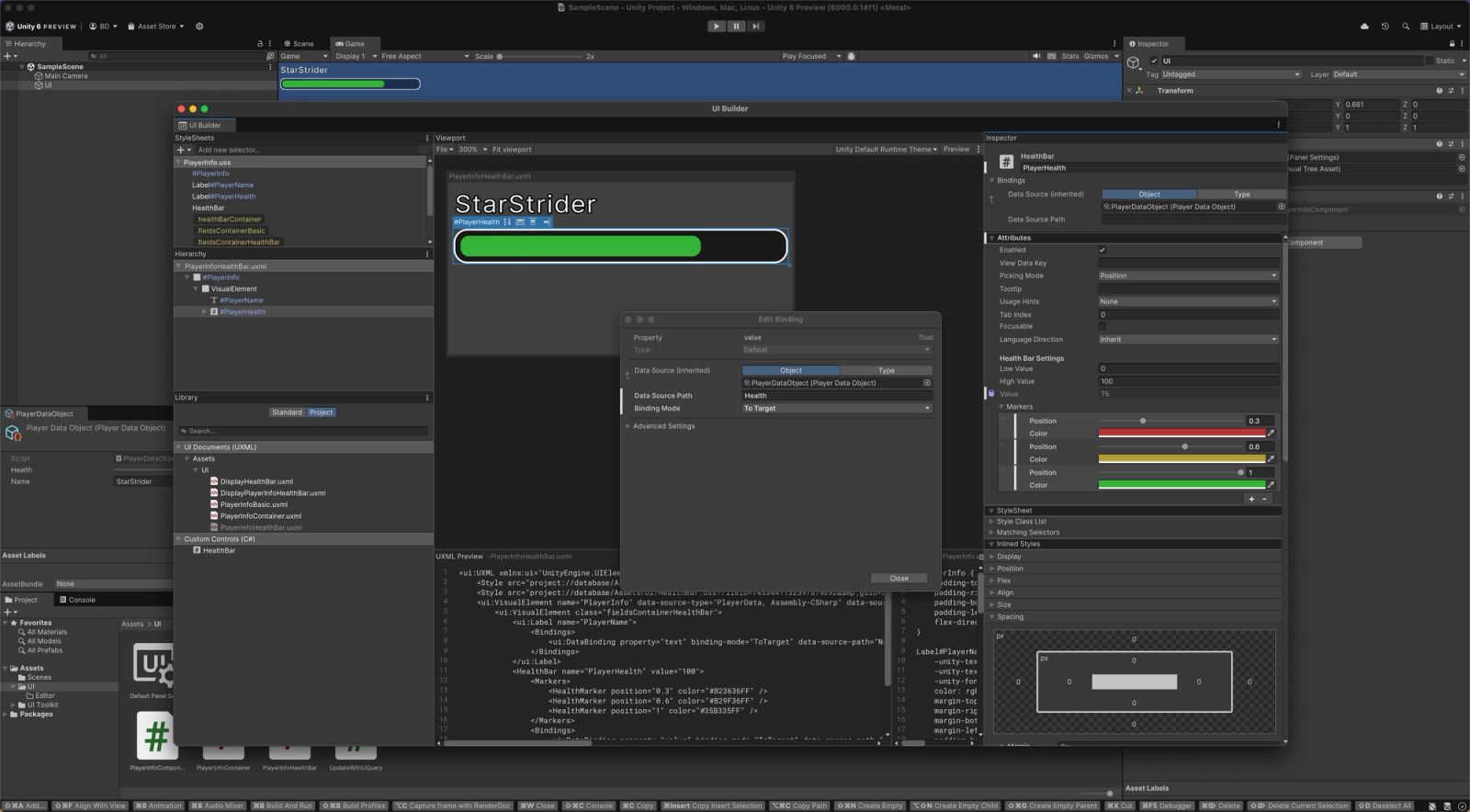
UI Toolkit is the retained-mode system modeled on web tech. Structure lives in UXML files, styling lives in USS (a CSS dialect), and layout is flexbox. You author in UI Builder and query elements from C#. It started as the editor tooling system, which is why the Unity editor itself is built with it.

UI Builder, the visual editor for UI Toolkit. Image: Unity Manual.
What Unity itself recommends (it is not what you think)
This surprises people. In the official comparison page for Unity 6.3 LTS, the recommended runtime system is still uGUI, with UI Toolkit listed as the alternative. For editor tools it flips: UI Toolkit recommended, IMGUI as the alternative. The same recommendation is still on the 6.6 page, which is the current release as I write this.
So if you are on an LTS and you just want to ship, Unity's own docs point you at the Canvas. That is not an insult to UI Toolkit. It reflects three gaps the 6.3 table marks with a red X: no in-scene authoring, no serialized events, and no integration with Animation Clips and Timeline.
What changed in Unity 6.2 through 6.7
The old complaints were "no world space, no custom shaders, no real animation." Go down the list:
- World-space UI landed in 6.2, so diegetic panels and VR menus are possible without a render texture hack.
- Custom shaders arrived in 6.3 with a UI target in Shader Graph (URP), plus USS filters like blur and grayscale, and native SVG import.
- MonoBehaviour references to elements came in 6.5 and 6.6 through
VisualElementReference, so you can drag an element into a serialized field instead of writing string queries everywhere. - Performance work in 6.5 moved computed styles to unmanaged memory (Unity measured 42 to 73 percent fewer allocations in its own test UIs) and made mesh updates up to 20x faster on WebGL.
- Drop shadows and backdrop filters shipped in 6.6. Gradients,
gapandz-indexfollow in 6.7. - Keyframed animation in the Animation window and in-scene authoring are in 6.7, which is still in beta as of mid November 2026.
Unity's own September status post says that with 6.7, UI Toolkit "covers most use cases for game UI." Tellingly, the 6.7 beta docs drop the explicit "recommended: uGUI" row and just tell you to choose by feature.
On 6.3 LTS, Unity still recommends uGUI for runtime UI. On 6.7, that recommendation quietly disappears. Which engine version you ship on matters more than which system is "better."
Where uGUI still wins
- You are on 6.3 LTS or older. Animation Clips, Timeline and scene authoring for UI Toolkit are not there. If your UI needs choreographed, animator-driven juice, the Canvas is the path of least pain.
- Inspector-wired events. Serialized events are still a uGUI-only feature, even in the 6.7 table. Designers who hook up buttons without touching code will miss this.
- Effects inside the UI. Soft masking, particles, and 2D or 3D GameObjects rendered inside UI are still on the UI Toolkit roadmap, not shipped. Loot-box sparkle and character previews in a menu are easier on a Canvas.
- The ecosystem. Most UI assets, tween libraries and visual scripting integrations target uGUI. If you lean on third-party tools, check what they support before you commit.
- Addressables and camera-space UI. Both are listed as roadmap items for UI Toolkit with no date.
Where UI Toolkit wins
- UI-heavy games. Inventories, skill trees, strategy and management screens, anything with hundreds of elements. Stylesheets mean you restyle every button in the game by editing one USS class, not 200 prefabs.
- Lots of screen sizes. Flexbox layout handles ultrawide, phone and Steam Deck far more gracefully than juggling anchors and Layout Groups.
- Data binding. Runtime binding lets a health bar follow a field on a data object with no update code. It pairs nicely with a ScriptableObject-driven architecture (see when to actually use ScriptableObjects).
- Crisp, textureless UI. Rounded corners, borders and vector shapes render without sprite atlases, with built-in anti-aliasing and SVG support.
- Editor tools. Custom inspectors and windows should be UI Toolkit, full stop. This is the one case with no real debate.
- Right-to-left text and emoji are supported in UI Toolkit's text engine and not in uGUI's table.
The honest downsides of UI Toolkit
If you have never written CSS, the learning curve is real. USS is a subset, so half the tricks you find in web tutorials will not work (media queries and extra units are still on the roadmap). Debugging "why is this element zero pixels tall" is a rite of passage. And the best features live in versions past the current LTS, which means riding update releases that lose support the moment the next one ships. That is a legit risk for a commercial project.
So which one should you pick?
- Shipping on 6.3 LTS with a small or animation-heavy UI: uGUI. Boring, proven, done.
- Shipping on 6.3 LTS with a big, data-heavy UI and a programmer who is fine with CSS: UI Toolkit, and accept code-driven transitions in place of Animation Clips.
- Starting a long project now that will ship on 6.7 LTS or later: UI Toolkit for menus and HUD is a reasonable default. Keep a Canvas around for the odd particle-heavy screen.
- Existing game with working uGUI: do not migrate for fun. Nothing announced takes uGUI away, and rewriting UI rarely sells a single extra copy.
- Any editor tooling: UI Toolkit.
Mixing is allowed, by the way. Plenty of projects run a UI Toolkit menu stack with a uGUI world-space widget or two. Both work with the new Input System, so if you are still on the old manager, sort that out first with our Input System vs legacy Input Manager guide.
One practical tip before you commit
Build your single ugliest screen in both. Usually that is the inventory or the settings menu with rebinding. Give each system one afternoon. You will know which one your brain and your team's workflow agrees with, and that matters more than any feature table. If you are buying UI kits or tools to speed things up, check the listing for which system it targets. That goes for anything you grab on DevLoot or any other marketplace: a uGUI prefab kit will not drop into a UXML project.
TL;DR
uGUI is not dead and UI Toolkit is no longer unfinished. On 6.3 LTS, Unity still recommends uGUI for runtime and the gaps are real (animation, scene authoring, serialized events). By 6.7 most of those gaps close, and UI Toolkit becomes the sensible default for UI-heavy games. Pick by engine version and by how much UI you have, not by forum vibes.