Unity VFX Graph vs Particle System: Which One Your Game Actually Needs
You need a fire effect. You open Unity and there are two ways to make one. There is the Particle System component that has shipped with the engine since roughly forever, the one everybody still calls Shuriken. And there is VFX Graph, the node editor behind every flashy effect thumbnail on YouTube. Half the tutorials treat the old system as fine, the other half act like it is deprecated. It is not deprecated, and picking wrong costs you either a week of rework or a build that will not run on a chunk of your target hardware.
Here is the actual split, including the parts that never make it into the comparison tables.
The real difference is where the math runs
Shuriken is a component. You drop it on a GameObject, tick modules in the Inspector (Emission, Shape, Velocity over Lifetime, Color over Lifetime), and Unity simulates the particles on the CPU. Position updates, lifetime, forces, collisions: all CPU work, then the results get pushed to the GPU as geometry every frame.
VFX Graph is an asset. You author a node graph with contexts (Spawn, Initialize, Update, Output), and the simulation compiles into compute shaders that run on the GPU. The CPU barely touches it after the effect starts. That single architectural fact drives almost every other difference between the two.
The number people quote is roughly this: Shuriken gets uncomfortable somewhere in the low thousands of particles per system, and VFX Graph will push hundreds of thousands to millions on a decent GPU without the CPU noticing. That is a real gap. It is also irrelevant to most of what you are actually building.
Count how many particles your effect really needs. If the honest answer is four hundred, the GPU system is solving a problem you do not have.
The requirement that decides it for you
Before you weigh anything else, check this: VFX Graph requires compute shader support. No compute shaders, no effect. Not a degraded version, nothing.
In practice that means:
- Desktop and console: fine. Compute is everywhere.
- Android: you want Vulkan. OpenGL ES is a bad fit for VFX Graph, and if your build falls back to GLES on older or budget devices, your effects vanish on exactly the phones that make up a big slice of the install base.
- Web: classic WebGL has no compute shaders. The WebGPU build target in Unity 6 is the path that makes VFX Graph viable in a browser, and that means telling a chunk of your audience to use a browser and machine that supports it.
- Mobile VR and standalone headsets: depends entirely on the device and API. Test on hardware before you commit, not in the Editor.
If you are shipping to mobile with a GLES fallback, or to web without gating on WebGPU, Shuriken is not the compromise choice. It is the only choice that ships. You can check at runtime with SystemInfo.supportsComputeShaders, but a runtime check does not author you a second version of every effect.
The gameplay callback problem
This one catches people mid-project. Shuriken particles can talk to your game logic. The Collision module with Send Collision Messages turned on fires OnParticleCollision on the hit object, and the Trigger module gives you a callback with the particle list. That is how you make a flamethrower that actually burns things, or rain that pings surfaces.
VFX Graph does not give you that. Particles collide with signed distance fields, primitive shapes, or the camera depth buffer, and all of it stays on the GPU as a visual result. Depth buffer collision in particular is a cheap approximation that is great for sparks and rain and useless for anything your C# needs to know about. Getting per-particle state back to the CPU means reading back GPU buffers, which is work you do not want in a hot loop.
The fix is not to force VFX Graph to do gameplay. It is to separate the two: run your damage, triggers, and hit detection in code with real colliders, and let the particles be decoration that reacts to events you send in. That is better architecture in both systems anyway, but with VFX Graph it is mandatory.
Authoring speed versus authoring ceiling
Shuriken is faster to start. A hit spark, a dust puff, a muzzle flash: you can have something acceptable in five minutes without learning a new editor. Every Unity dev already half knows the modules. Presets and prefab variants cover reuse well enough for a small project.
VFX Graph has a genuine learning curve. Contexts, blocks, operators, attributes, and property binders take a weekend to stop feeling alien. What you get for that is a much higher ceiling: exposed properties so designers can tune an effect without touching the graph, Shader Graph integration that drives per-particle shader values for color randomization and dissolves, mesh and texture sampling to spawn particles off geometry, and custom HLSL blocks when you want flocking or a procedural simulation that no built-in block covers.
Unity 6 closed most of the reasons people avoided it. URP and HDRP now have far closer feature parity, so a VFX Graph effect is no longer a signal that you committed to HDRP. Six-way lighting gives you smoke that reads correctly under changing light without a volumetric budget. There are built-in Profiling and Debug panels showing CPU and GPU timings, memory, and texture usage per effect. And the VFX Graph Learning Templates ship a pile of small, commented sample graphs covering orientation, flipbooks, strips, decals, and collisions, which is the fastest way in if you learn by taking things apart.
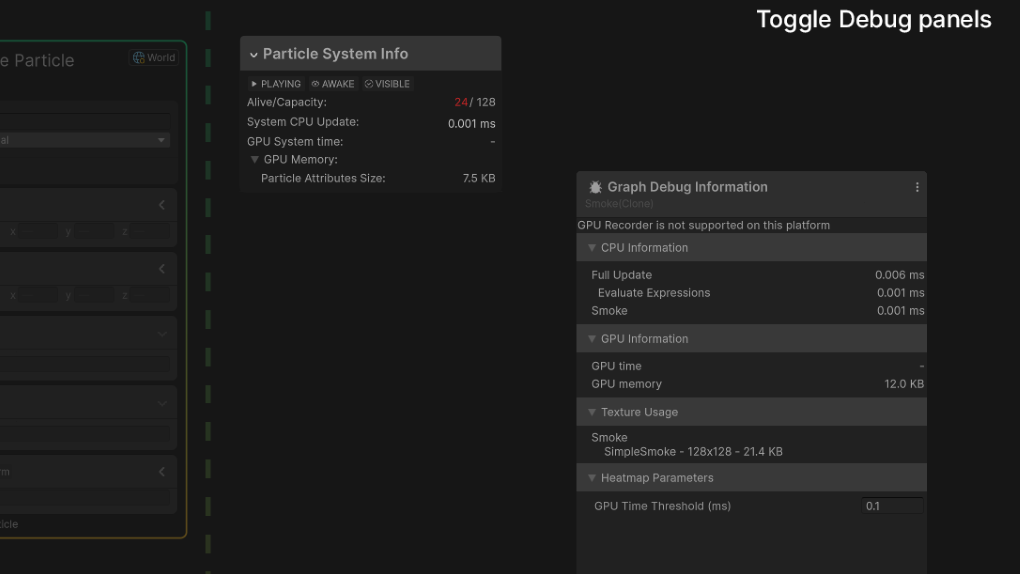
The Profiling and Debug panels in Unity 6 VFX Graph. Image credit: Unity Technologies.
What actually kills your frame rate
Both camps get this wrong. The thing that tanks performance in particle effects is almost never particle count. It is overdraw.
A soft alpha-blended quad that fills half the screen costs fill rate whether one particle drew it or a GPU system drew it. Stack thirty of those smoke puffs in front of the camera and you are shading the same pixels thirty times. On mobile that is the whole budget. VFX Graph will happily let you spawn a million particles and then die on fill rate with the frame time coming from the exact same place it would have with Shuriken.
So before you switch systems for performance reasons, profile and find out what you are actually bound by. Shrink your particles, cut the count, use flipbook textures so one particle does the work of ten, and clip the transparent edges of your sprites. If your CPU frame time is the problem and it traces to particle simulation, then yes, moving to the GPU is the right call. If you have not looked, you are guessing. The same discipline applies to the rest of your render cost, which we covered in draw calls and batching in Unity.
A decision you can make in thirty seconds
Use the built-in Particle System when: you target mobile or web with any chance of a non-compute fallback, your particles need to trigger gameplay code, your effects are in the hundreds not the hundreds of thousands, or you just need a hit spark today.
Use VFX Graph when: you ship desktop, console, or Vulkan-only mobile, you want dense effects (sand, embers, magic swarms, large scale weather), you need particles spawned from meshes or textures, you want artists tuning exposed properties without code, or your CPU is already the bottleneck and the simulation cost is measurable.
Use both. This is the answer for most shipping projects, and it is not a cop-out. Gameplay-critical and mobile-safe effects go through Shuriken. Set-piece hero effects and ambient density go through VFX Graph. They coexist in the same scene without issue.
One practical note if you buy effects rather than build them. Check which system a VFX pack was authored in before you pay, and which render pipeline it targets, because a pack of gorgeous HDRP VFX Graph effects is dead weight in a mobile URP project. Any decent listing says so up front, and on DevLoot that detail belongs in the pack description alongside the Unity version. If it is not listed, ask before you buy. While you are checking, make sure the pipeline matches what you picked in URP vs HDRP.
The short version
Shuriken is not legacy, it is the CPU option, and the CPU option is the one that runs everywhere and talks to your game code. VFX Graph is not an upgrade, it is a different tool with a hardware requirement and a higher ceiling. Pick based on your target platforms and whether your particles need to trigger anything, not based on which editor looks more impressive in a screenshot.